A real shell on
mobile & desktop,
thinks with you.

One SSH workspace for every platform, a real terminal, on-device AI and a full server toolkit.

Coming soon to
UbuntuSoon WindowsSoon AndroidSoon WebSoon
On-device AI · nothing leaves your device iPhone · iPad · Mac · Apple Silicon + Intel
Shellme macOS Dashboard Shellme macOS Hosts Shellme macOS Terminal Shellme macOS AI Shellme macOS Transfers Shellme macOS Network Shellme macOS Apps Shellme macOS Cron Jobs Shellme macOS MCP Shellme macOS Settings
Live health
CPU 23% · 0.5/0.9 GiB · streaming
Network live
↓ 174 KB/s · ↑ 2.5 KB/s
MacOS Native app
prod-api-01
● Connected · 21d uptime
AI ready
Apple Intelligence · on-device
kill process using port 3000
SFTP Transfer
backup.tar.gz · 3.2 GB · 82%
500+ Commands
Library · Vault · Mini-Apps
nginx · docker · git · Kubernetes
11:27
Terminal
prod-api-01×
Esc Tab ^C |
Shellme
Describe what you need
How do I check disk usage in Linux?
Linux Apple Intelligence
Safe Linux
$df -h
Show disk usage and available space on all mounted drives
Command Reference
Files & Directories 21
lsList files
ls -laAll files + hidden
ls -lhHuman-readable sizes
cd <dir>Change directory
pwdWorking directory
mkdir <dir>Create a new directory
File Viewing 19
Search & Find 21
Networking 23
iPhone · iPad iOS
Ubuntu Debian Alpine Fedora RHEL Arch macOS Windows Server FreeBSD Raspberry Pi OS Proxmox AWS Hetzner DigitalOcean
One workspace · two apps

Take Shellme anywhere,
and go all-in on the Mac.

Shellme ships as a focused mobile SSH client and a full native desktop workspace. Both share the same accounts, hosts and command library, the Mac just unlocks far more power.

iPhone · iPad
Shellme for iOS
Mobile SSH

A real shell that fits in your pocket. Connect, fix and monitor servers from anywhere, with on-device AI and a keyboard built for the command line.

  • Real VT100 terminal & SSH sessions
  • On-device AI command help
  • 200+ admin mini-apps & command library
  • SFTP transfers, widgets & themes
Native macOS app
Shellme for macOS
Full workspace

A complete SSH, SFTP, monitoring, automation and security workspace, agentless over your existing SSH connection, with everything on bigger screens.

  • Multi-session terminal: split, columns & 2×2
  • 300+ visual server apps & live dashboards
  • Network, firewall, cron & SFTP management
  • Team Vault & MCP access for AI agents
01 · Connection

Six steps from tap to
production shell.

Every session shows a clear connection timeline, from resolving the host to opening the secure shell, with helpful status updates and a remote profile once connected.

Shellme
01
02
03
04
05
06
01DNS resolve00.08s
Resolves prod-api-01 against your device's resolver, v4 and v6 records.
02TCP connect00.14s
Opens a direct connection to 104.21.45.67:22 with a heartbeat to keep it alive.
03SSH handshake00.32s
Negotiates encryption and verifies server identity. First-time fingerprints surface an inline trust prompt; pinned to the Keychain.
04Authentication00.41s
Password or Ed25519 / ECDSA public key from the Vault. Every auth event is written to the Activity Log.
05Channel open00.48s
Opens a full terminal session sized precisely to your screen. Resizes instantly when the keyboard appears or hides.
06Session established00.52s
Displays the session banner, fetches your remote system profile (OS, CPU, memory, uptime) and lands you at the prompt. A toast confirms and auto-dismisses.
02 · AI command assistant

Describe it.
Get one line back.

Type what you need in plain English. Shellme returns a single, reviewable shell command, OS-adapted, explained, and rated for danger. Nothing gets run without your tap. Nothing leaves the device.

11:30
Shellme AI
Describe what you need
One focused command, ready to review
show disk usage by folder
Linux ⌄ Apple Intelligence
Safe
Linux
$du -sh * | sort -rh
Show size of each item, largest first
▶ Run
⎘ Paste

One prompt field.
Six quick commands.
Nine local models.

Tap a card to run an OS-aware diagnostic without typing. Every response picks the right tool for the remote system you're on.

CPU
top -b -n 1
Memory
free -h
Disk
df -h
Files
ls -lah
Ports
ss -tulpn
Uptime
uptime
Local models · optimized for on-device speed
Shellme Engineinstant · built-in
Apple Intelligenceon-device
Qwen 2.5 Coderdownloadable
Qwen 2.5downloadable
Phi-3.5 Minidownloadable
LLaMA 3.2downloadable
SmolLM2downloadable
Qwen Coderdownloadable
03 · Command library

500+ commands.
38 categories.
Yours, tagged and testable.

Files & Directories21 File Viewing19 File Permissions15 Search & Find21 Text Processing22 Archives18 Networking23 DNS & Ports15 Process Mgmt20 System Info19 Memory & CPU14 Disk & Storage18 User Mgmt17 Package Mgmt22 Systemd16 SSH & Remote18 File Transfer14 Docker20 Kubernetes18 Git24 Files & Directories21 File Viewing19 File Permissions15 Search & Find21 Text Processing22 Archives18 Networking23
11:41
Expand All Command Reference Done
Files & Directories21
lsList directory contents
ls -laList all files with details
cd <dir>Change directory
pwdPrint working directory
mkdir <dir>Create new directory
File Viewing19
File Permissions15
Search & Find21
Text Processing22
Archives18
Networking23
DNS & Ports15
Process Mgmt20
System Info19

Not just a cheat-sheet.
A working bench.

Search highlights matches in yellow. Tap a command to drop it straight into the active session. Expand or collapse any section. Built for one-handed reach and muscle memory.

500+Built-in commands
38Categories
Custom commands
▸ My commands Live SSH · prod-api-01
Restart nginx with config check
$nginx -t && systemctl reload nginx
▶ Test Command Save Pick host ⌄
04 · Admin mini-apps

200+ admin mini-apps.
One tap each.

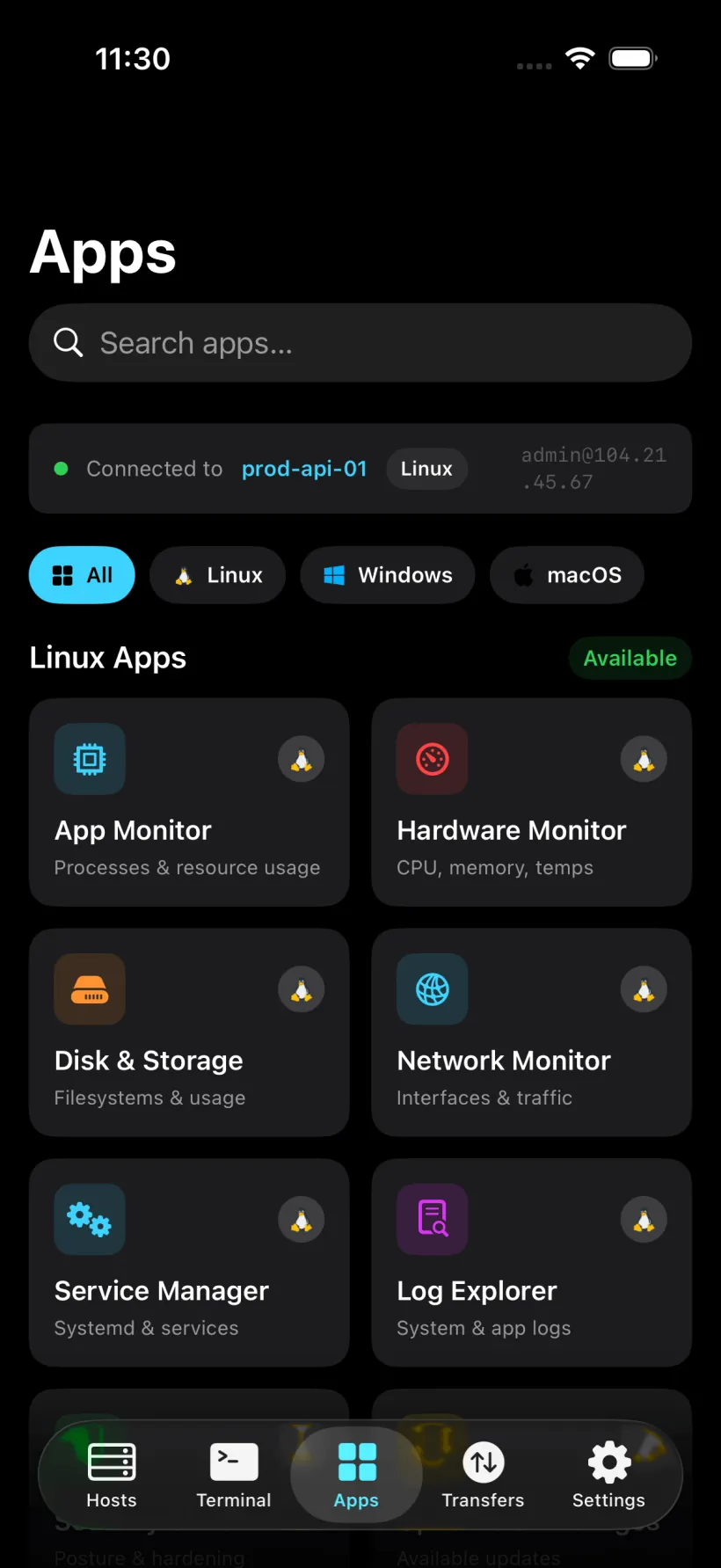
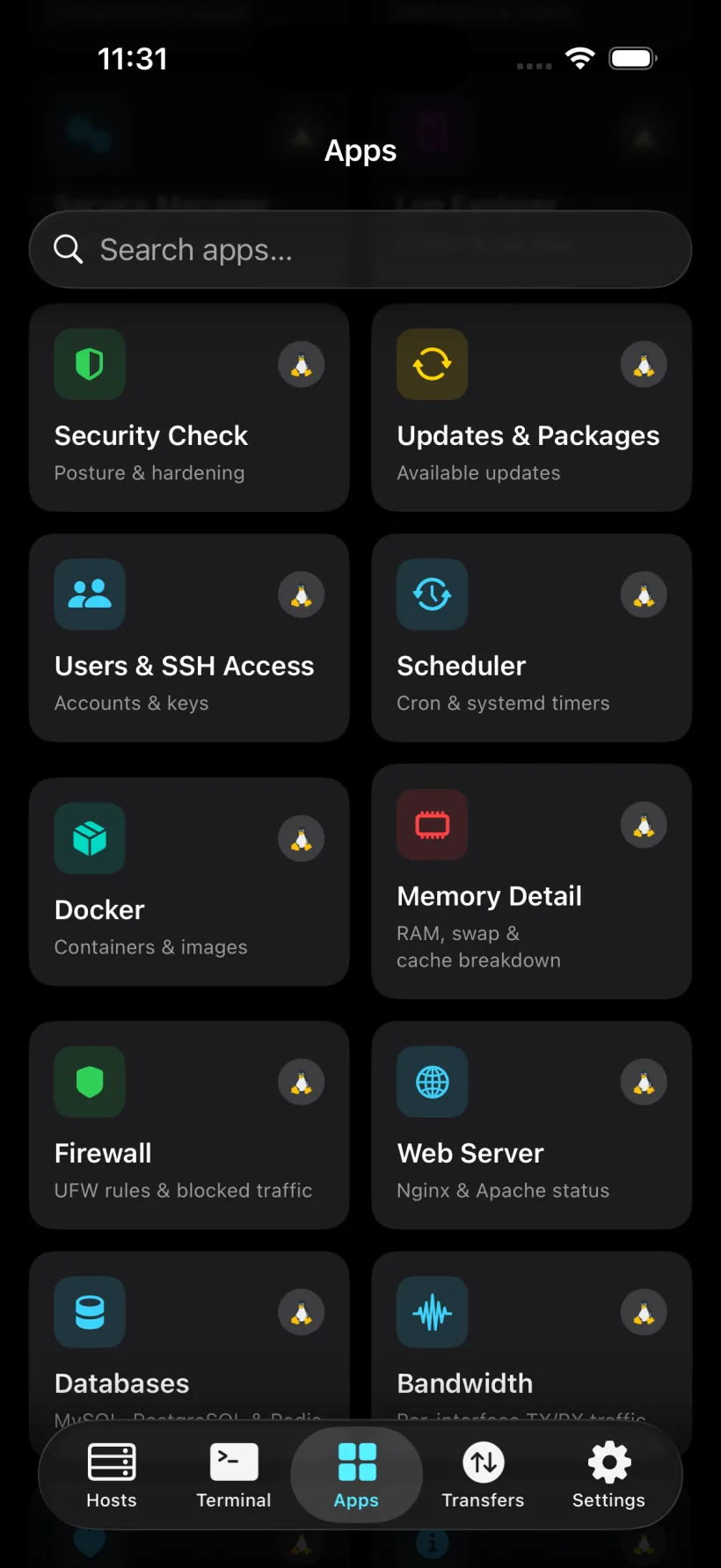
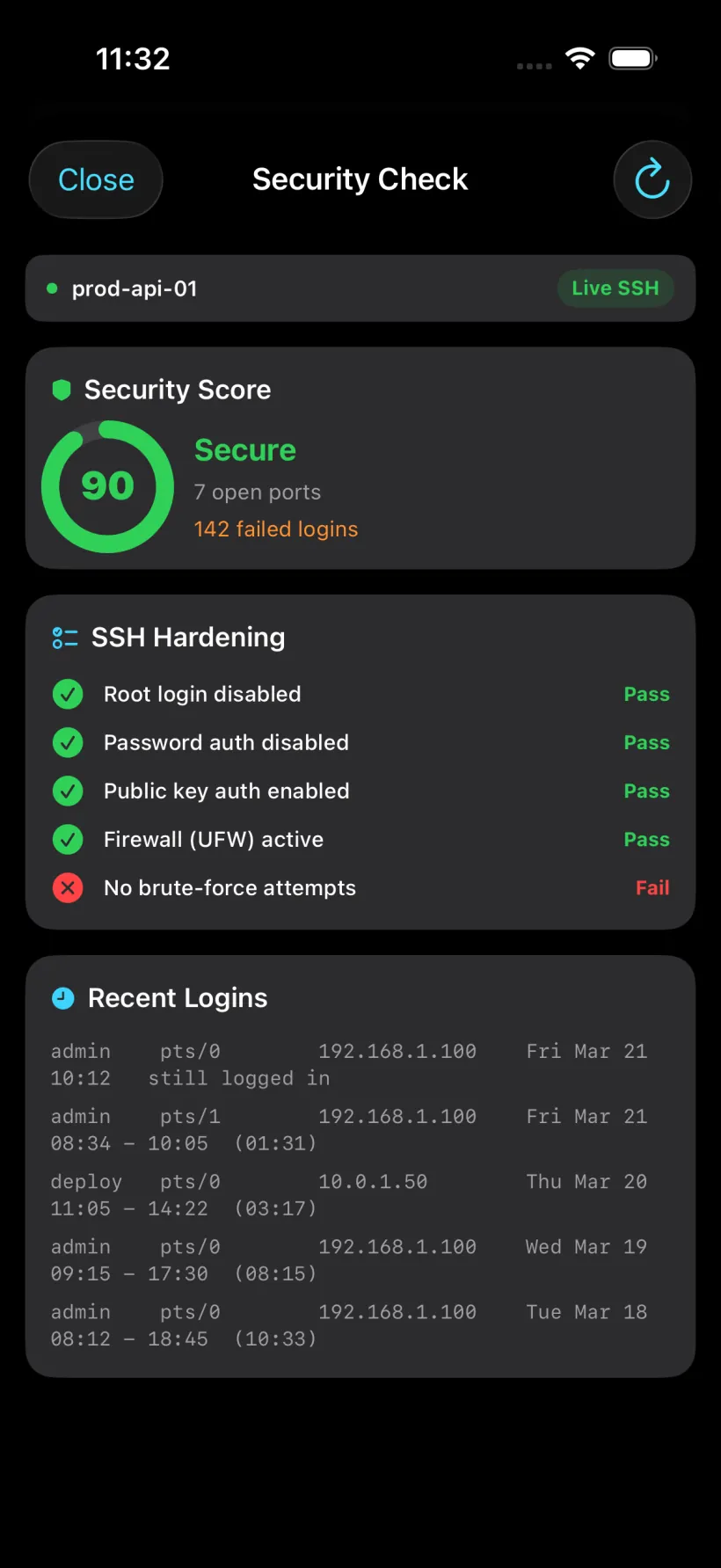
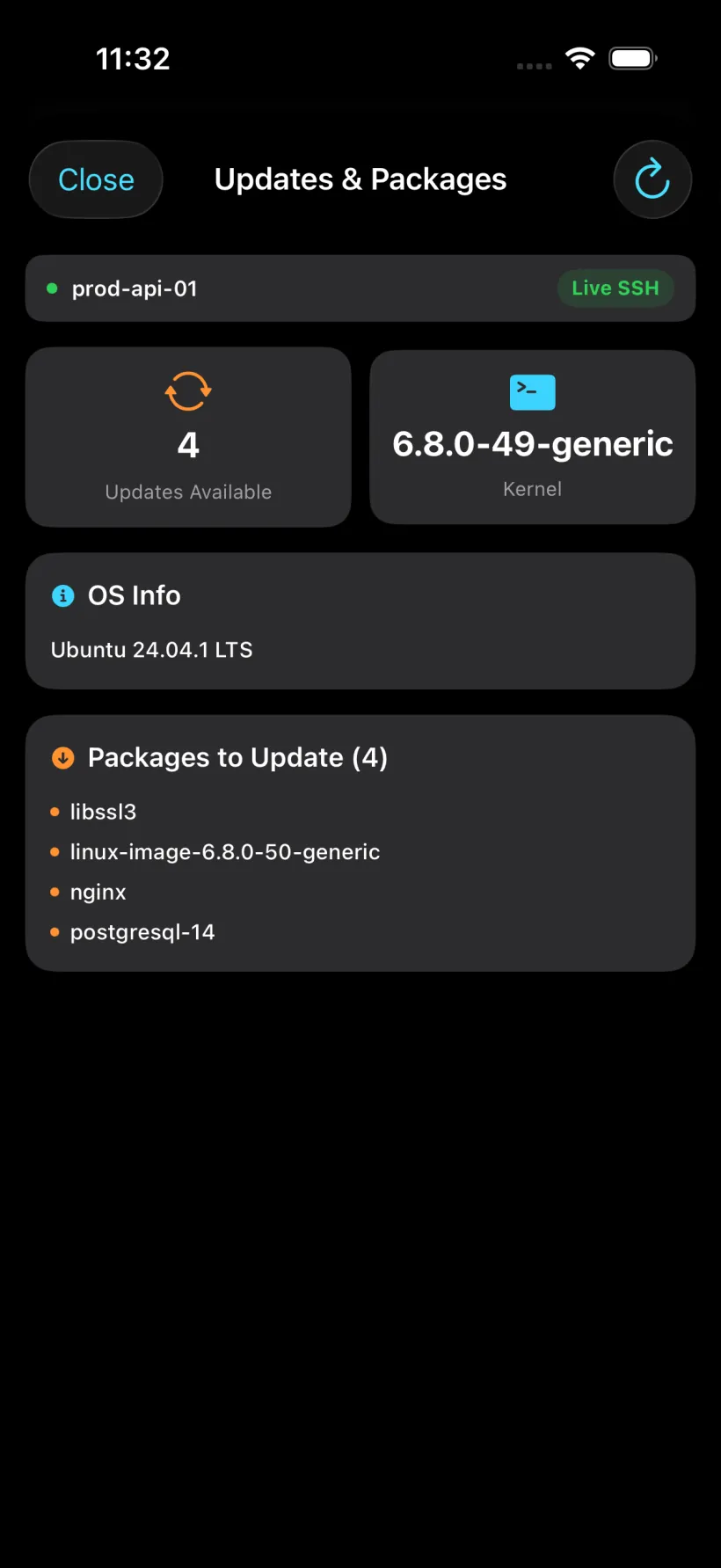
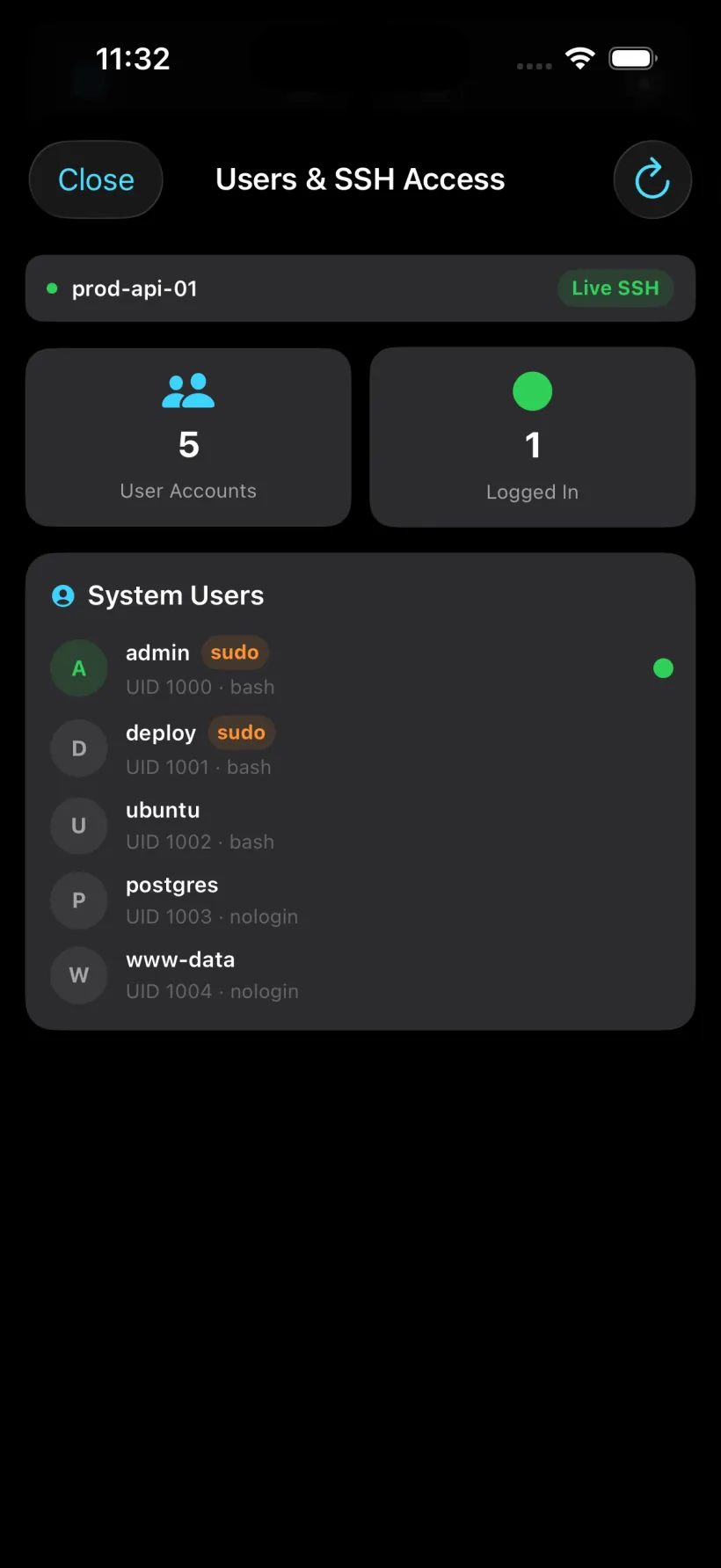
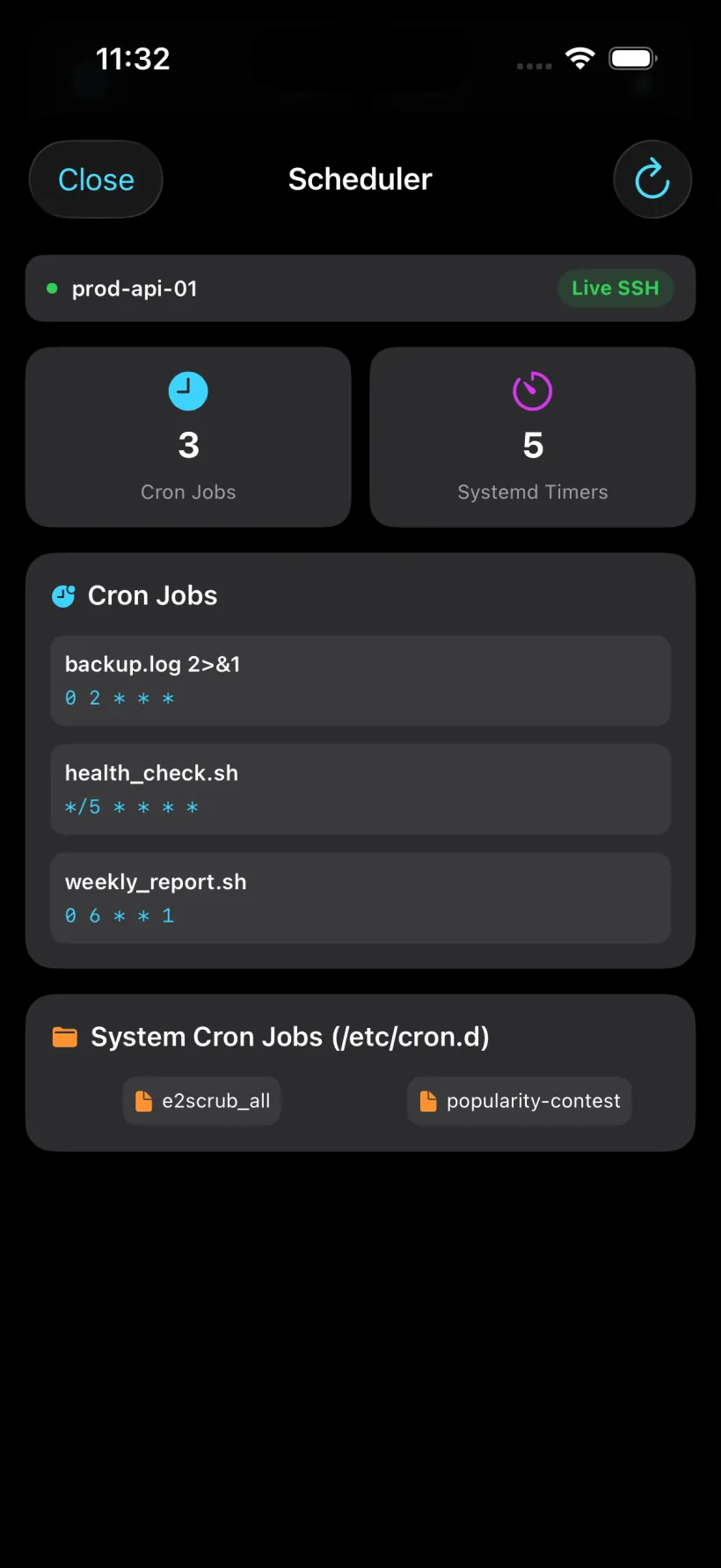
Focused diagnostics and monitors for the host you're on: 122 for Linux, 50 for Windows, 50 for macOS. Favorite any card; the OS badge makes its territory explicit.

All · 220+ Linux · 122 Windows · 50 MacOS · 50
Apps Overview 1
Linux · all tools
Apps Overview 2
Linux · Windows · more
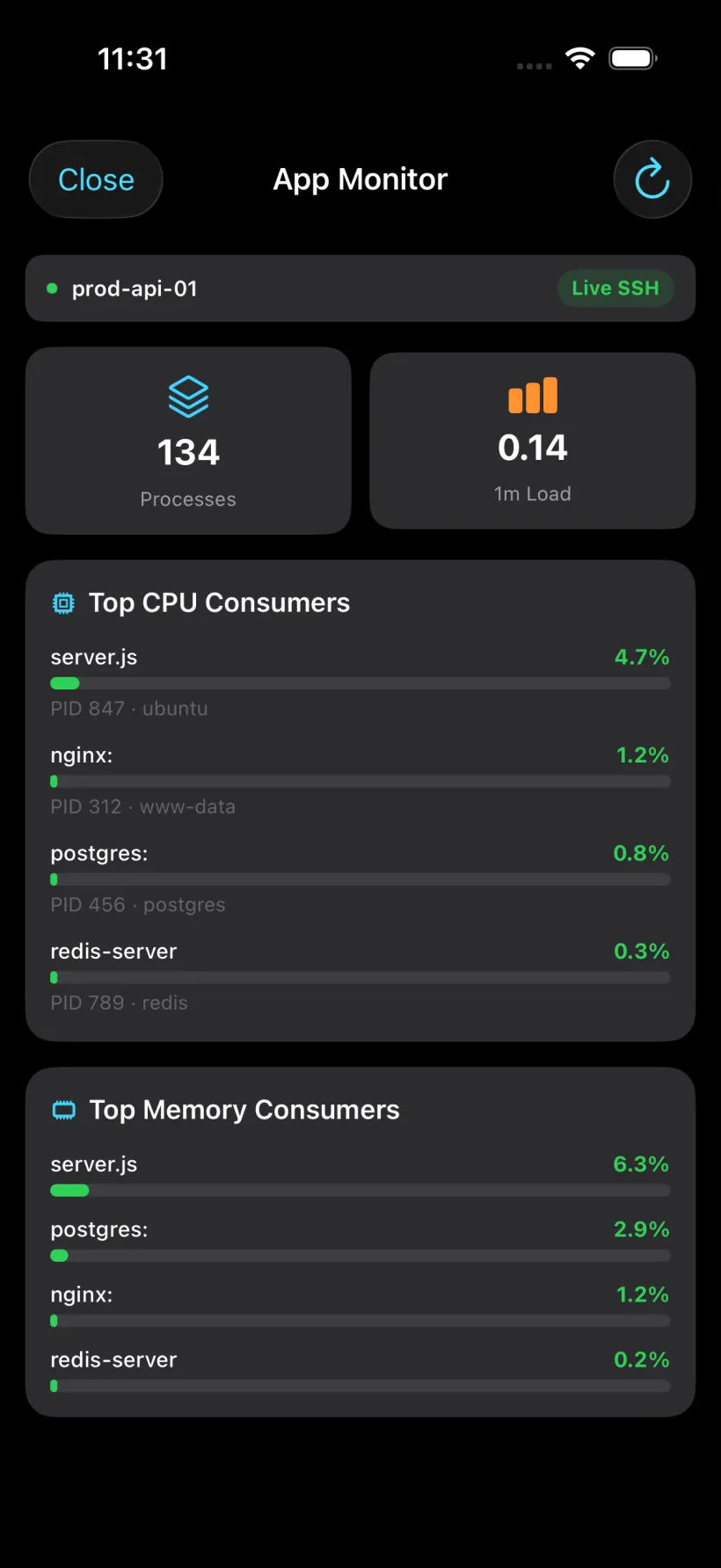
App Monitor
Processes & load
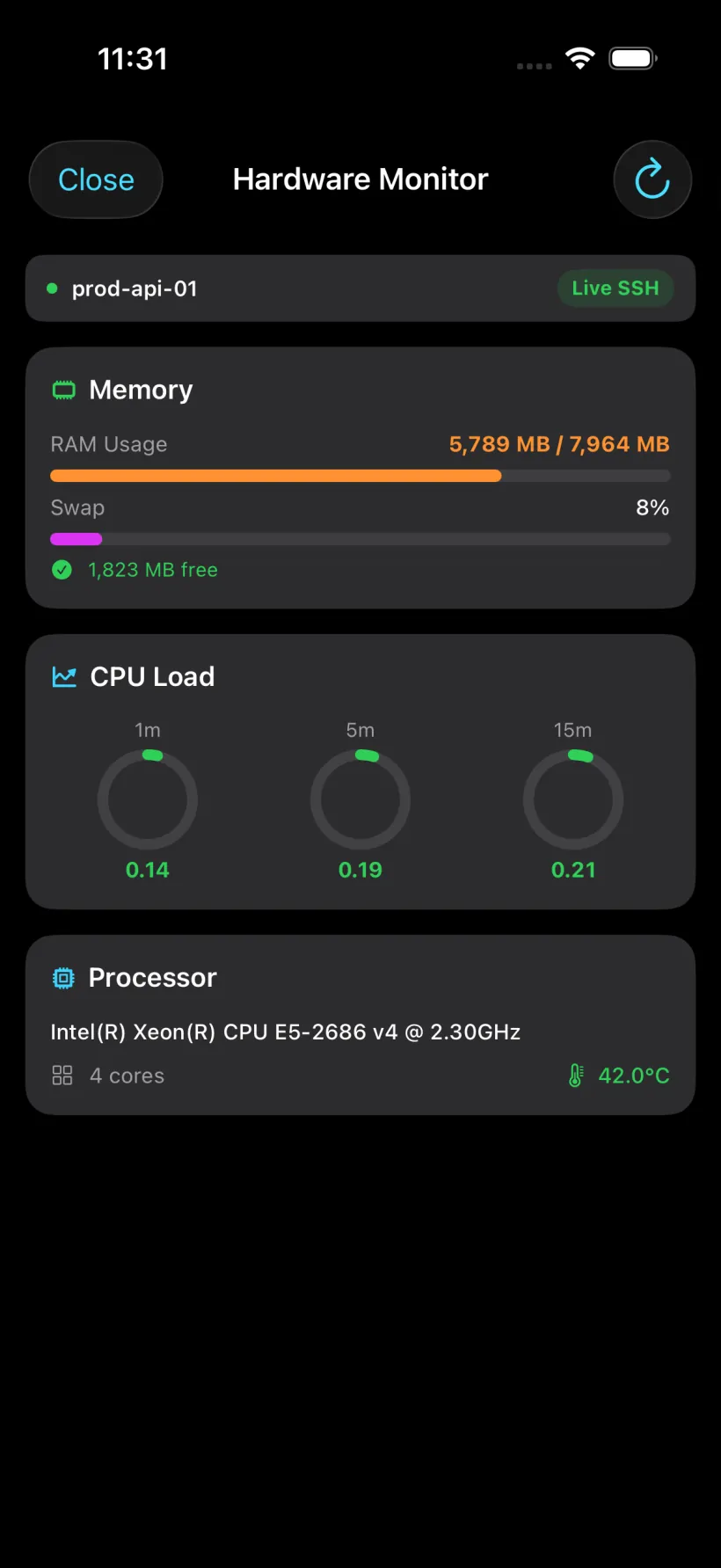
Hardware Monitor
CPU · memory · temps
Disk & Storage
Filesystems & usage
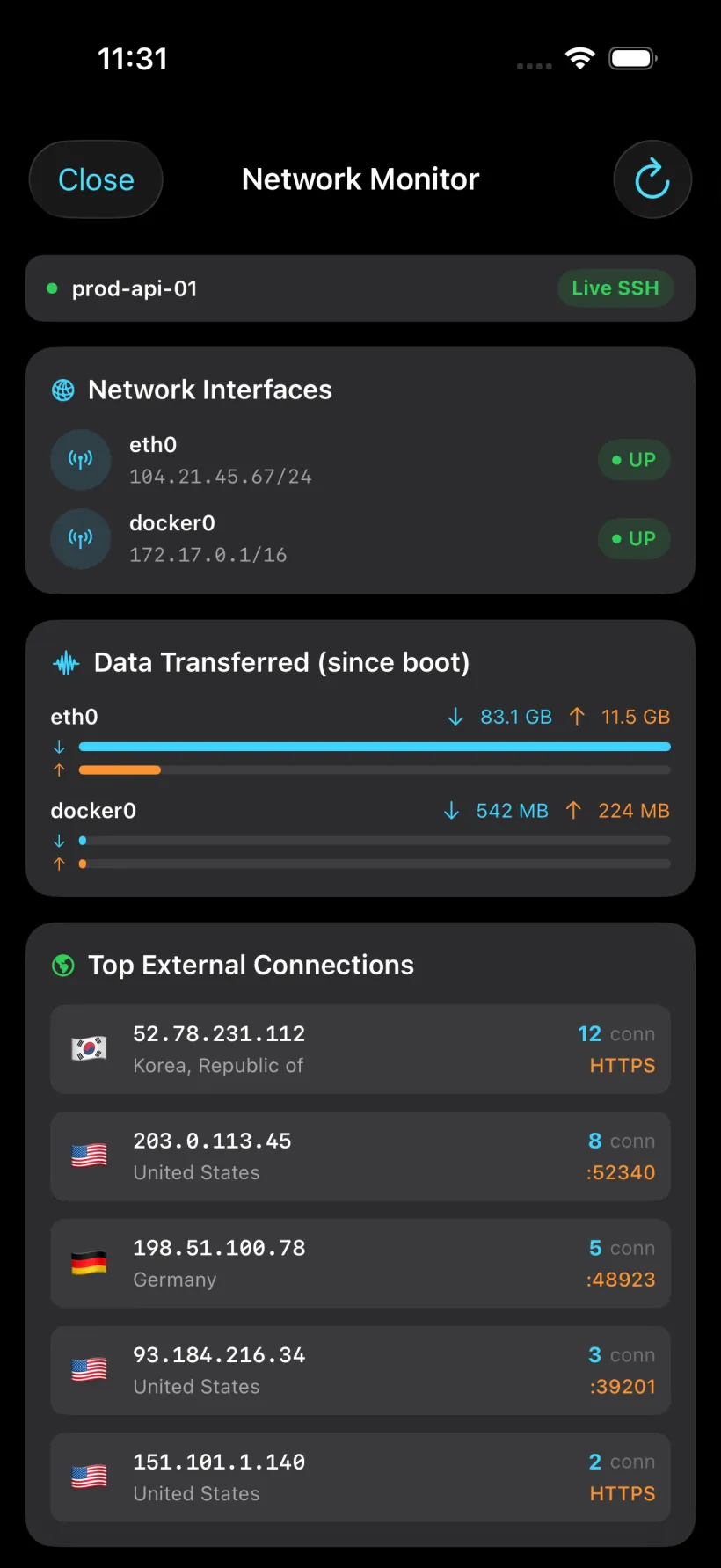
Network Monitor
Interfaces & traffic
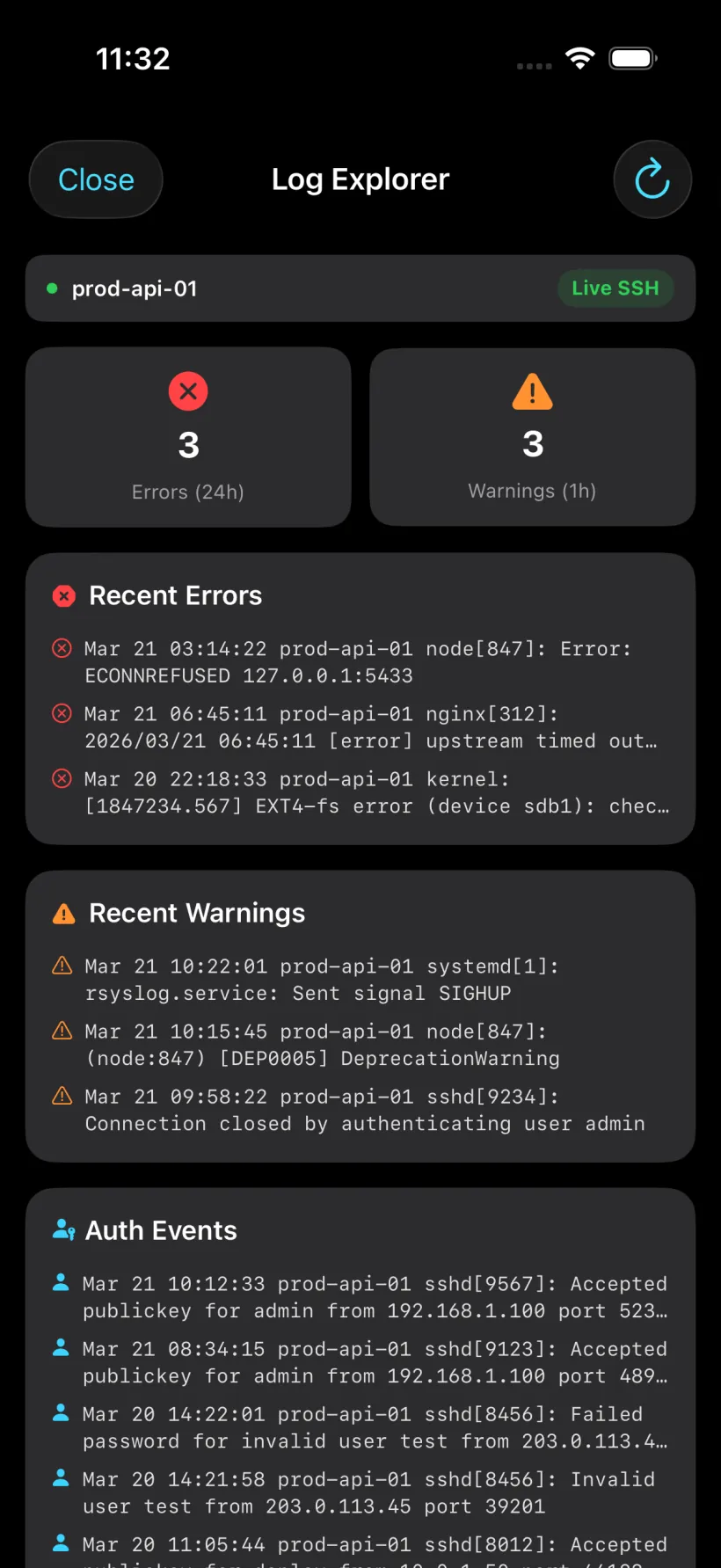
Log Explorer
System & app logs
Security Check
Posture & hardening
Updates
apt · dnf · pacman
Users & SSH
Accounts & keys
Scheduler
cron · timers
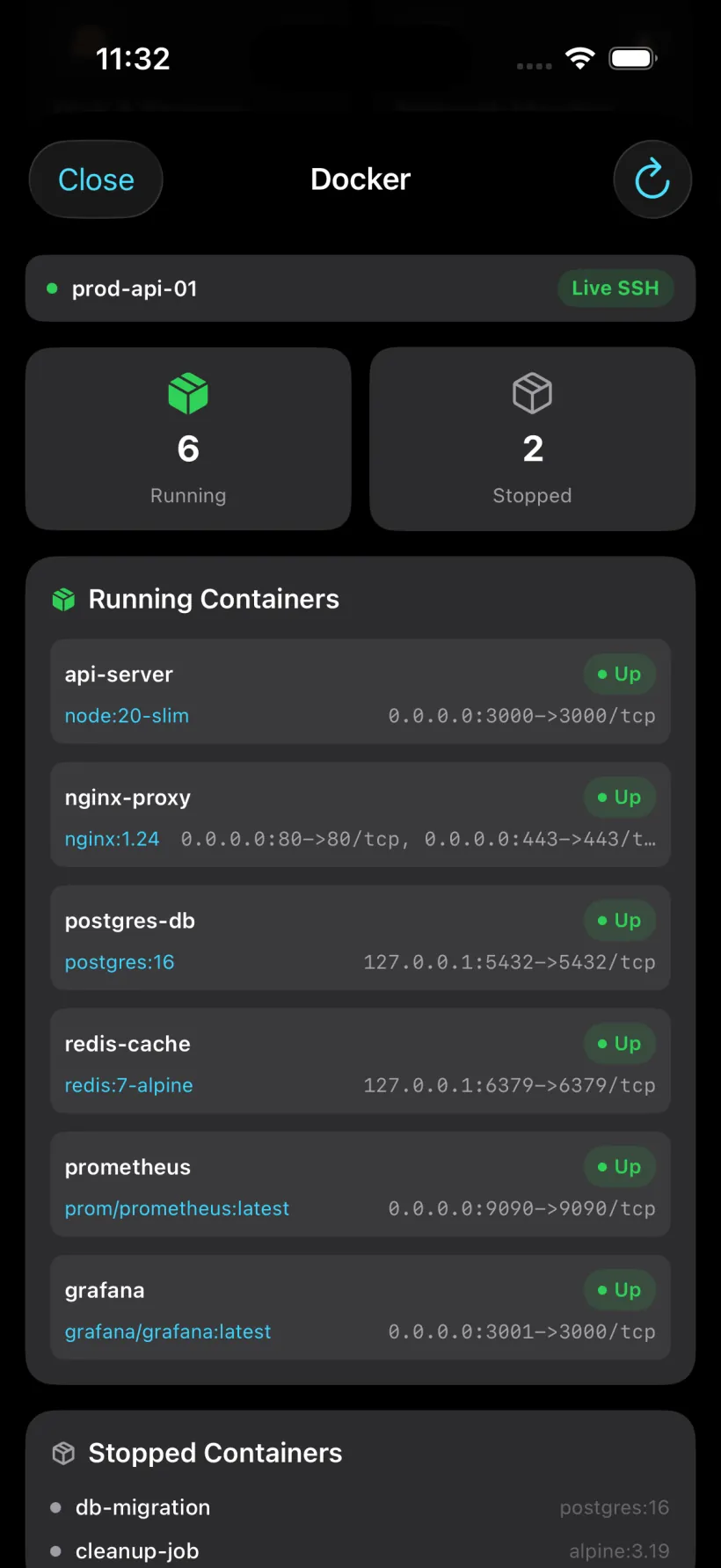
Docker
Containers & images
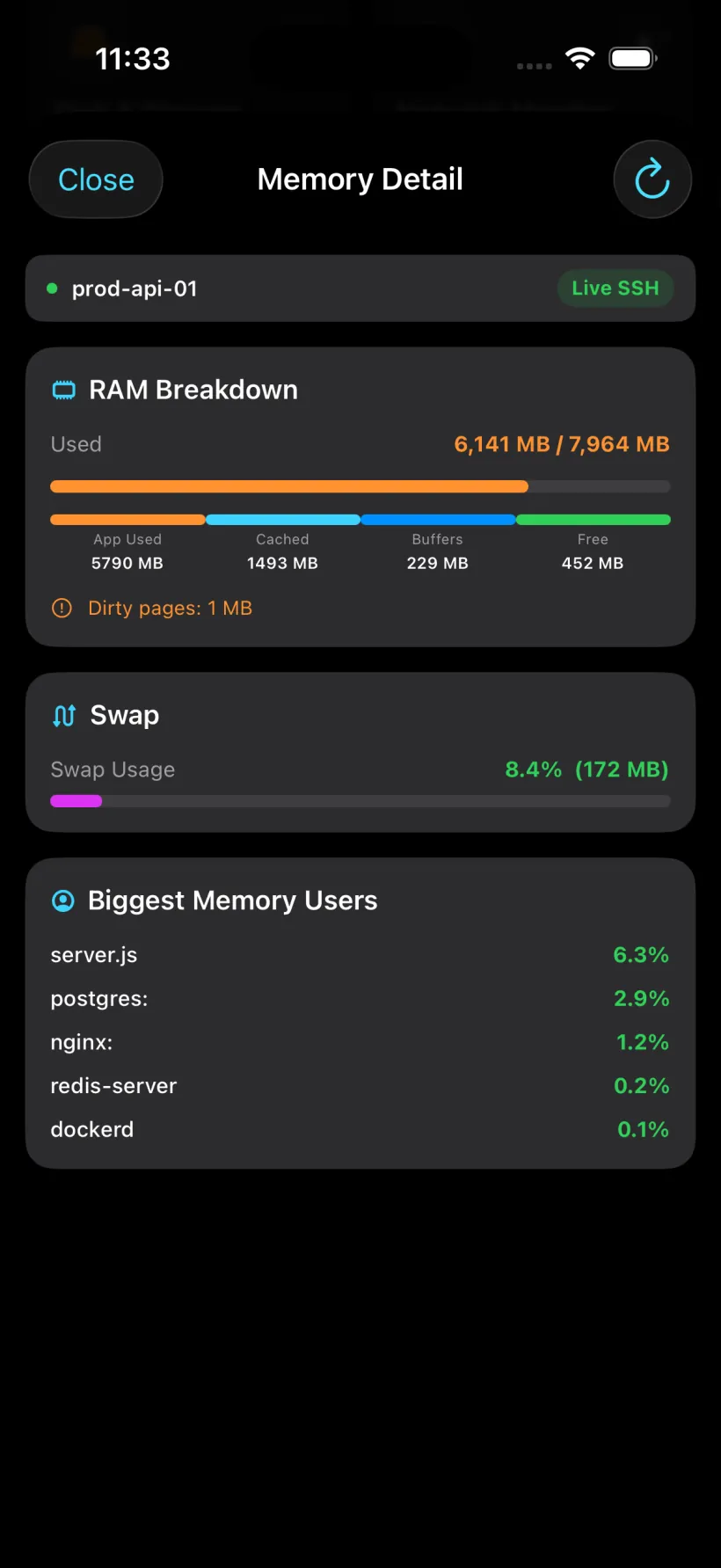
Memory Detail
RAM · swap
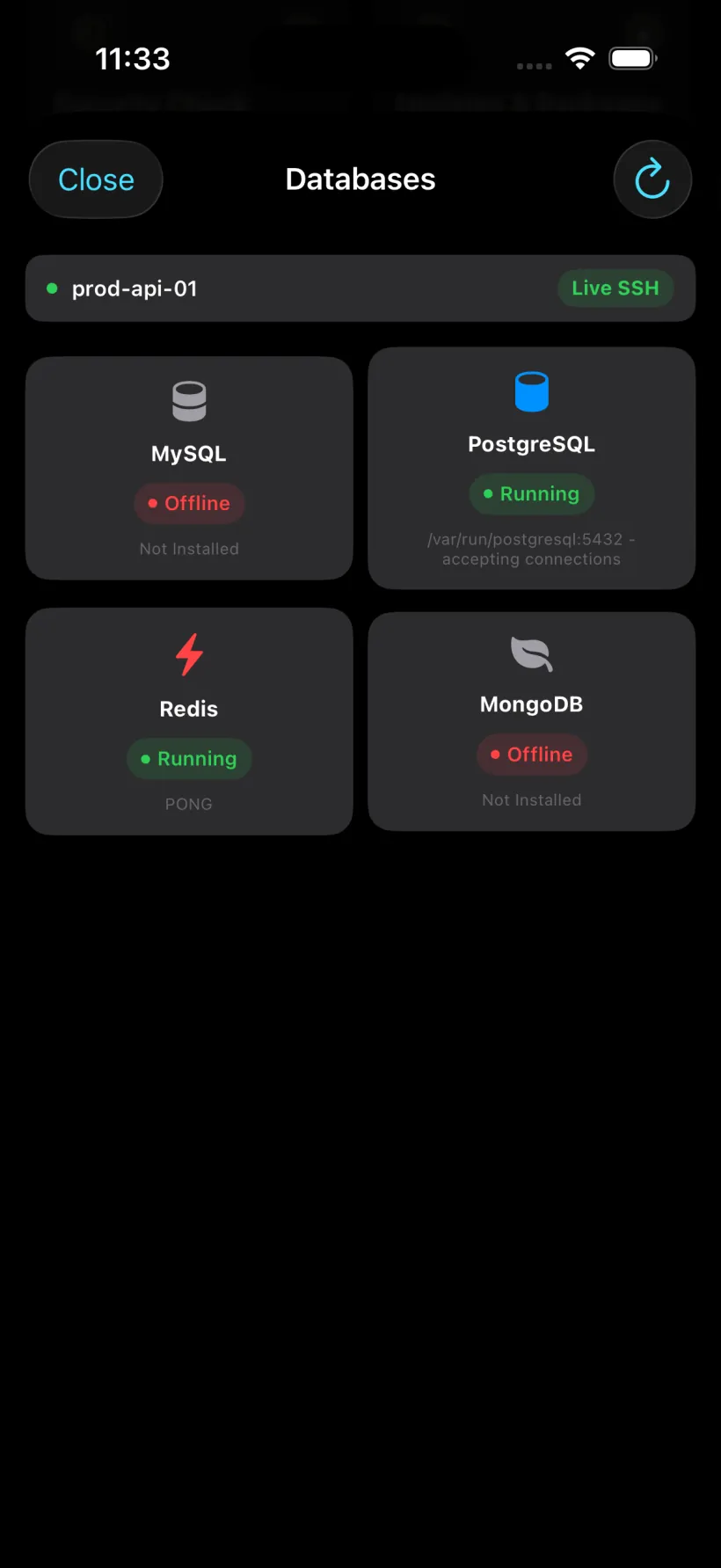
Databases
MySQL · PostgreSQL · Redis
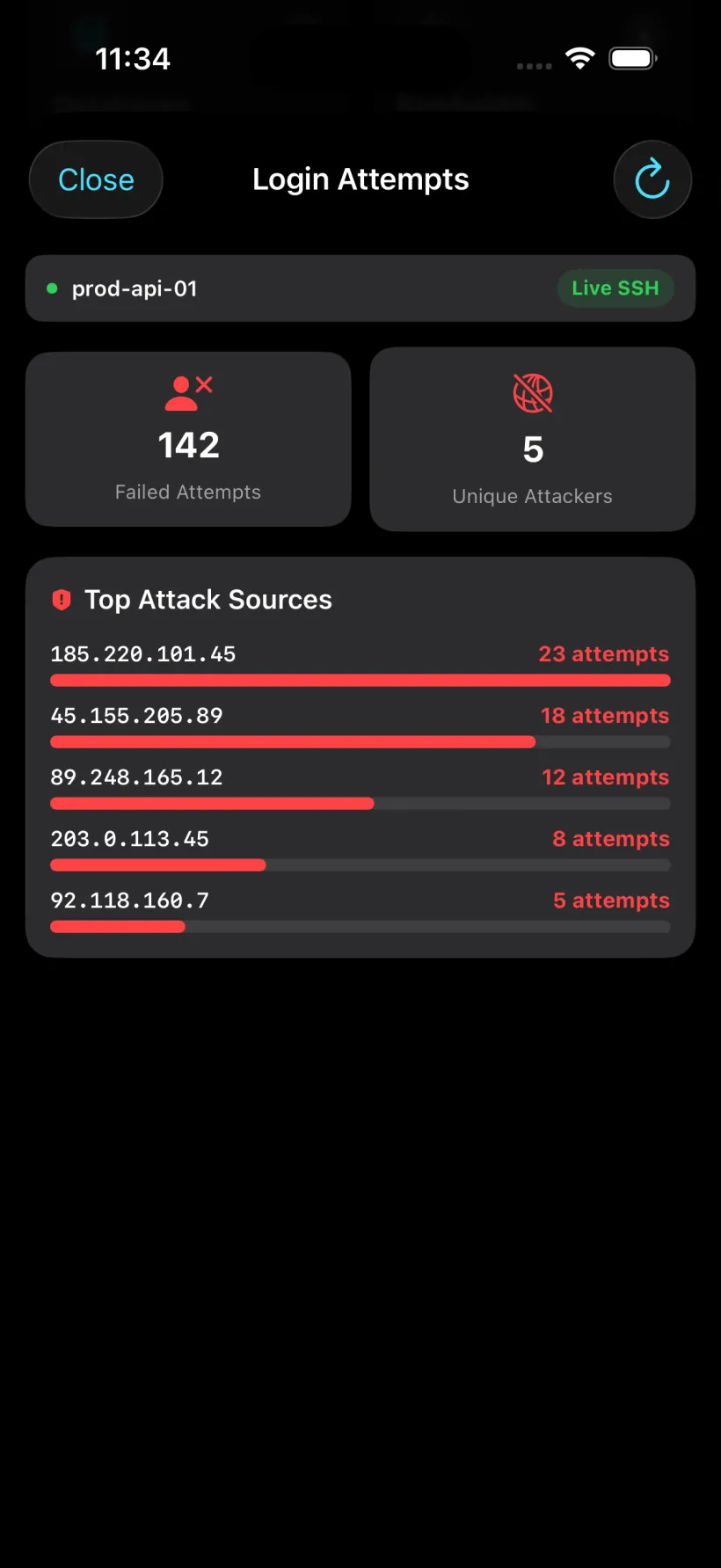
Login Attempts
Failed logins · attackers
Apps Overview 1
Apps Overview 2
App Monitor
Hardware Monitor
Disk & Storage
Network Monitor
Log Explorer
Security Check
Updates
Users & SSH
Scheduler
Docker
Memory Detail
Databases
Login Attempts
01/ 15
05 · Terminal keyboard

A keyboard
built for the shell.

Control
Navigate
Abc Symbols
Abc
Ctrl+Aline start
Ctrl+Eline end
Ctrl+Uerase line
Ctrl+Kerase to end
Ctrl+Wdelete word
Ctrl+Lclear screen
Ctrl+Rhistory search
Ctrl+Ypaste
Ctrl+Ttranspose
Ctrl+Phistory ↑
Ctrl+Spause
Ctrl+Qresume
Ctrl+Xchord
Ctrl+Oexecute
Ctrl+Nhistory ↓
⇥ Tabautocomplete
⌃C Interruptkill process
$ ls -la /var/log
ps aux | grep nginx

Every key that matters to a shell,
at thumb's reach.

Tap for line editing and history. for arrows and function keys. Abc for the stack of characters that real commands actually need. The triple-sent ⌃C lands even mid-flood.

|Shell operators, one pressPipes, redirects, backticks, globs. No long-press, no sheet.
^CTriple-sent interruptGuaranteed kill even when output is screaming at you.
Autocomplete everywhereTAB is a first-class citizen. So is ESC.
AI one tap awaySparkles open the assistant sheet without losing focus.
06 · Host management

Your whole fleet,
two thumbs deep.

Color-coded, tagged, grouped into folders, favorited, searchable. Swipe to delete or pin. Long-press to connect. Import and export as JSON, sync with iCloud, and restore credentials from iCloud on a new device.

!Production · 3 hosts
prod-api-01
apicritical
:22
prod-worker-02
queueredis
:22
Web Servers · 3 hosts
staging-web-01
staging
:22
web-app-02
nodejsbackend
:22
web-nginx-01
nginxproxy
:22

Swipe actions, context menus, folders

Swipe left on any host to delete or pin. Swipe right to file it into a folder. Long-press for the quick actions menu.

Delete
legacy-api-04
:22

Folders with icons, colors, reorder

Production, Web Servers, Database, Backup, DevOps. Grouped, iconified, colored, toggleable. Stored locally; carried across devices via iCloud.


Production

Web

Db

Backup

DevOps

iPad adaptive grid · sidebar on Mac

List on iPhone, adaptive grid on iPad, full sidebar on Mac. Every screen gets the right layout automatically.

07 · Vault & security

Keys under
Face ID glass.

Vault Unlocked
Keys and credentials accessible
Lock
SSH Keys · 2
ops-personal
ECDSA · 1Aa2Bb3Cc4Dd5Ee6Ff7G…
Face ID
prod-deploy
Ed25519 · 4Hq3m9K8xNzP2vR7wT…
Face ID
Generate
Import
Export

Every secret lives in the iOS Keychain. Never in app storage. Never on a server we own.

Keychain-only storage

Passwords, private keys, and server fingerprints are stored in the iOS Keychain. They stay local unless you enable optional iCloud sync for selected vault items.

Biometric vault

Face ID / Touch ID gates the whole vault, with device passcode fallback. Lock and unlock from Settings.

Auto-clear clipboard

Copies wipe themselves after 5 to 120 seconds. Default 30s. Because one stray screenshot is enough.

Fingerprint trust prompts

Every new host surfaces its fingerprint inline. Trust pins to the Keychain. No silent interception.

iCloud backup

Opt-in per item type. Optional encrypted iCloud sync gives you control over which vault items move between your devices.

Full activity log

Connect, authenticate, host key change, tunnels, transfers. Timestamped, searchable, exportable as JSON.

08 · Transfers · widgets · live activities

Files. Lock-screen.
Dynamic Island.

db_backup.sql.gz
Uploading
37.7 MB / 52.4 MBprod-api-01 · 4.8 MB/s
app.log
Completed
1.0 MB / 1.0 MB/var/log/app.log
docker-compose.yml
Completed
4 KB / 4 KB/home/ops/docker-compose.yml
config.yml
Completed
2 KB / 2 KB/etc/app/config.yml
deploy.sh
Completed
8 KB / 8 KBprod-api-01 · 2.1 MB/s
Quick connect
prod-api-01
Connected
web-nginx-01
Idle
Transfers
1 active
AI Assistant
one tap
db_backup.sql.gz37.7 / 52.4 MB · 4.8 MB/s

Quick Connect widget (small/medium/large), Favorite Host widget with lock-screen size, Transfers widget with progress bars, Live Activities for active sessions and ongoing transfers.

09 · 20 terminal themes

Dress your shell.
Live preview.

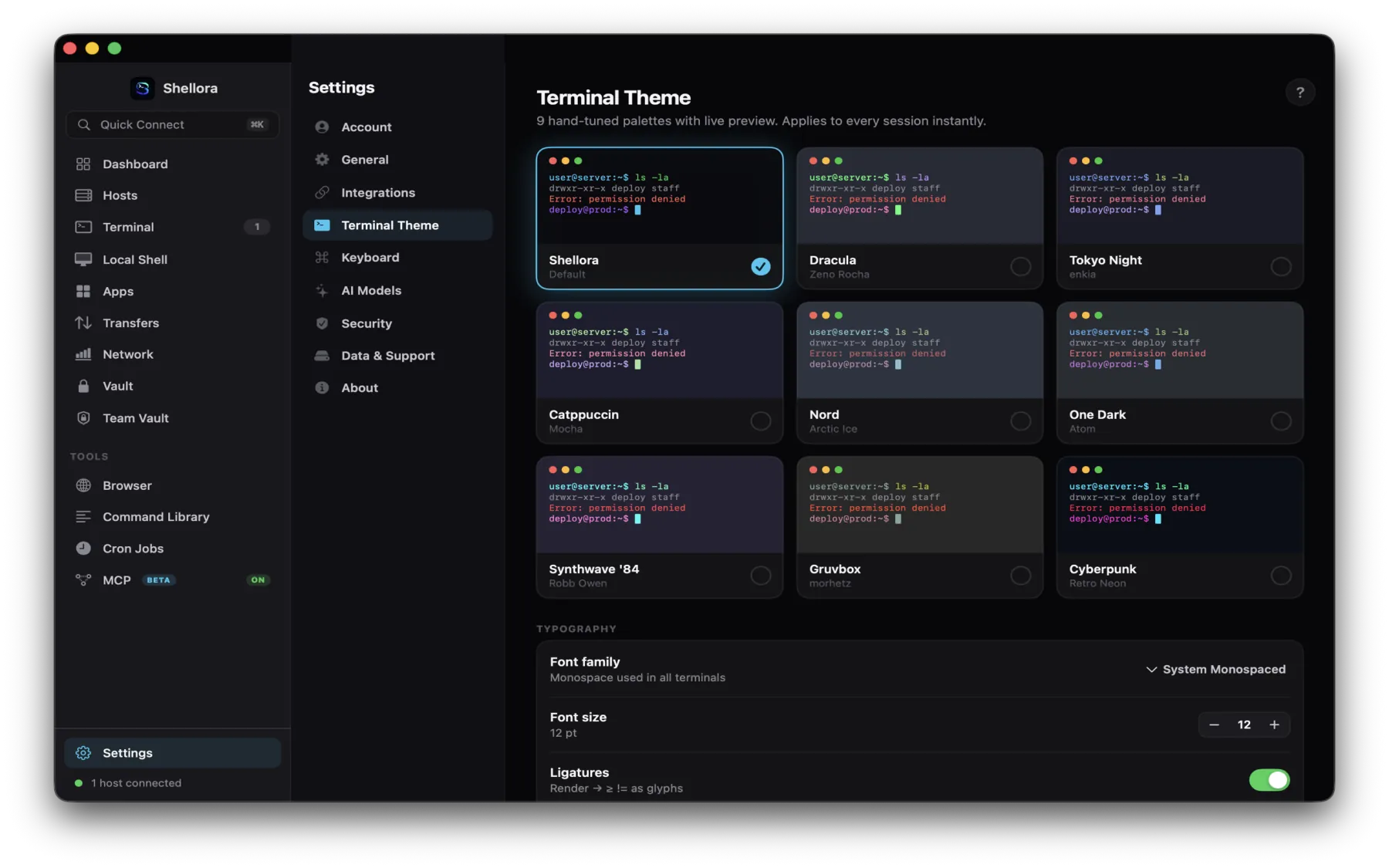
Shellme Dracula Tokyo Night Catppuccin Mocha Nord Synthwave Gruvbox One Dark Cyberpunk Ayu Dark
shellme: ssh
user@server:~$ ssh deploy@prod
Last login: Tue Apr 23 09:14:03 2026 from 198.51.100.30
deploy@prod:~$ ls -la
total 48
drwxr-xr-x deploy staff 4096 Apr 23 09:14 .
-rw-r--r-- deploy staff 220 Apr 23 09:14 .bashrc
-rw-r--r-- deploy staff 807 Apr 23 09:14 .profile
drwxr-xr-x deploy staff 4096 Apr 23 09:14 logs
drwxr-xr-x deploy staff 4096 Apr 23 09:14 scripts
deploy@prod:~$ systemctl status nginx
● nginx.service - The nginx HTTP server
Active: active (running) since Mon
Error: permission denied
deploy@prod:~$
Shellme
Default
Dracula
Zeno Rocha
Tokyo Night
Enkia
Catppuccin Mocha
Catppuccin
Nord
Arctic Ice Studio
Synthwave '84
Robb Owen
Gruvbox Dark
Morhetz
One Dark
Atom
Cyberpunk
Retro Neon
Ayu Dark
Dempfi
10 · Complete coverage

Everything else
in one wall.

Multi-session tabs

Open simultaneous SSH sessions, switch via a tab bar, add new tabs without leaving the terminal.

  • status dots
  • host aliases
  • per-tab history

Native VT100 terminal engine

Built in-house for real SSH sessions, with full-color rendering, dual-screen support, smart paste protection, and deep terminal history. No web view. No generic terminal wrapper.

  • no web view
  • no terminal wrapper
  • resizes with keyboard

Banner & profile

Welcome banner with connection table and remote system profile, fetched automatically on connect.

  • OS · version
  • CPU · mem · uptime
  • auto on connect

Import / Export hosts

Export and re-import your server list as a backup. No duplicates on import. Never get locked in.

  • JSON backup
  • no duplicates
  • auto-named file

Granular iCloud sync

Master toggle with individual controls: host info, passwords, private keys, server fingerprints.

  • live status
  • selective wipe
  • fresh device restore

Activity Log

Local, searchable history for connection, authentication, vault, transfer, and error events.

  • filter · search
  • copy as JSON
  • expand detail

Haptics & reduced motion

In-app haptics toggle, reduce-motion accessibility switch for full animation stripping.

  • Accessibility-ready
Aa

Font scaling 8 to 24pt

Live preview updates as you drag. Typography that matches your thumbs and your eyes.

  • live preview

iPhone · iPad · Mac · visionOS

Adapts from iPhone to iPad to Mac. Sidebar navigation on large screens, touch-optimized on small ones.

  • portrait iPhone
  • all orientations iPad
  • macOS native
11 · Localization

Twenty-four languages,
one shell.

The full interface, including commands, prompts, settings, and AI replies, is translated and typeset in each language. Automatic RTL layout for Arabic, Hebrew and Urdu. Native rendering for CJK, Cyrillic, Devanagari and Bengali scripts.

EnglishHello
GermanHallo
Japaneseこんにちは
FrenchBonjour
ItalianCiao
Korean안녕하세요
SpanishHola
DutchHallo
SwedishHej
NorwegianHei
DanishHej
FinnishHei
Mandarin你好
Arabicمرحبا
PortugueseOlá
PolishCześć
TurkishMerhaba
Hebrewשלום
GreekΓεια
CzechAhoj
Hindiनमस्ते
Bengaliহ্যালো
RussianПривет
Urduسلام
Shellme for macOS

The full server
workspace, native on Mac.

SSH, SFTP, terminal, monitoring, automation and security in one native Mac app. It turns plain SSH output into live visual dashboards, runs AI on-device, and manages firewalls, cron jobs and credentials, all agentless, over the connection you already have.

Native macOS app Agentless over SSH On-device AI macOS Keychain End-to-end encrypted Team Vault Apple Silicon + Intel Free · no subscription
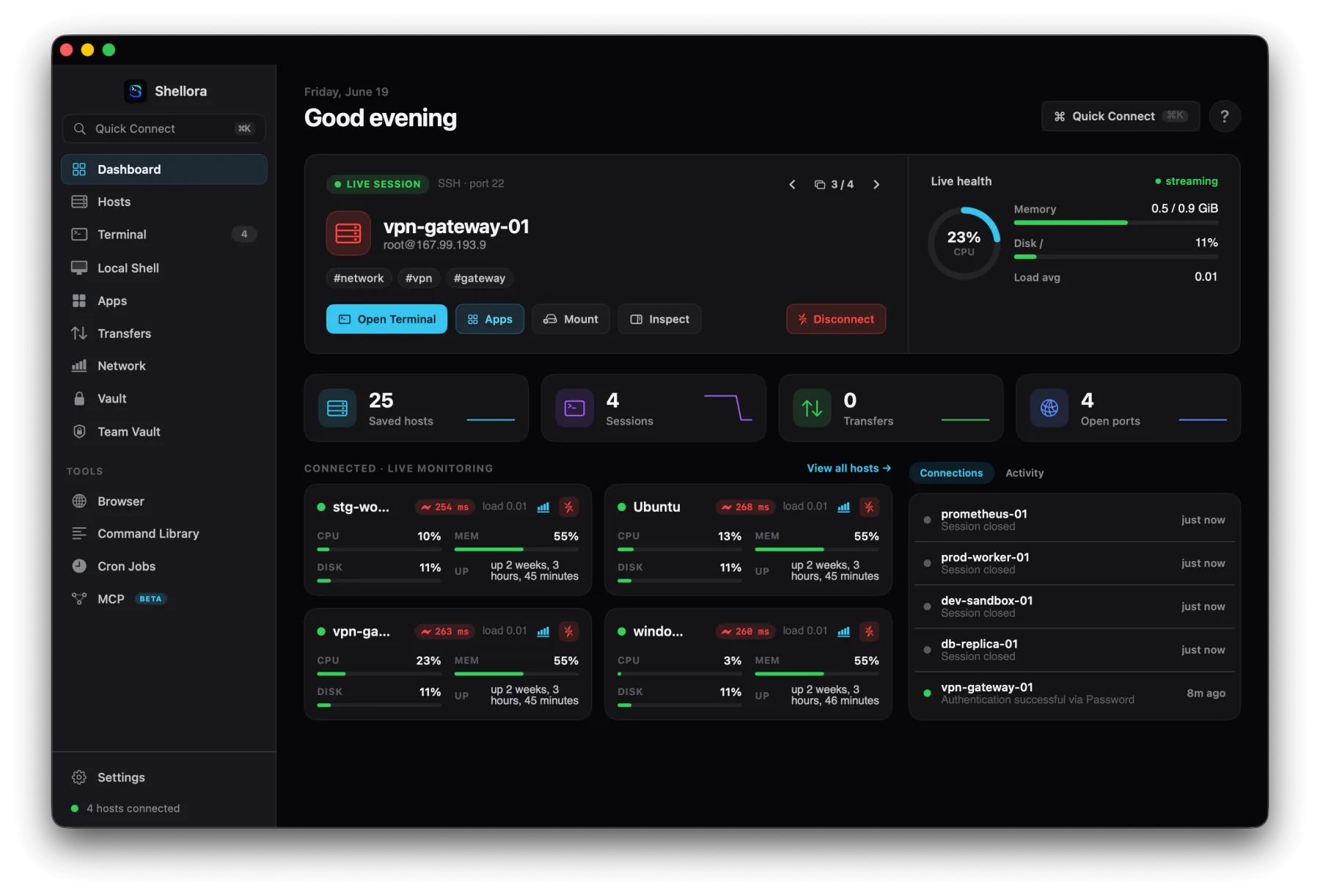
01 · Dashboard

Every server, at a glance.

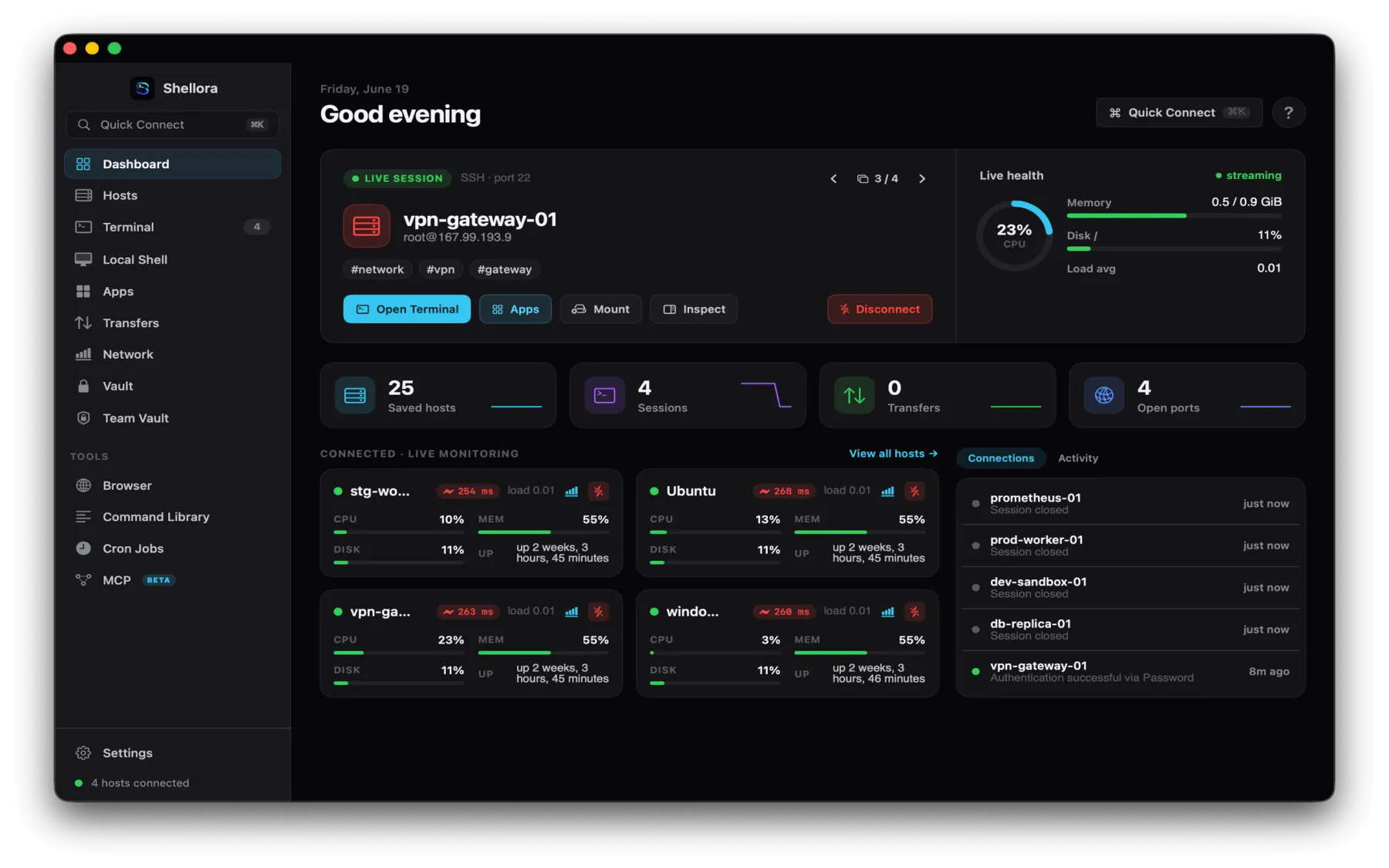
A live command center for everything you're connected to, sessions, health and activity update in real time as you work.

  • Live SSH sessions and connected host status
  • CPU, memory, disk, load and uptime streaming live
  • Saved hosts, active transfers and open ports at a glance
  • Jump straight to Terminal, Apps, Mount or Inspect
Shellme for macOS dashboard with live session, health metrics and connected hosts
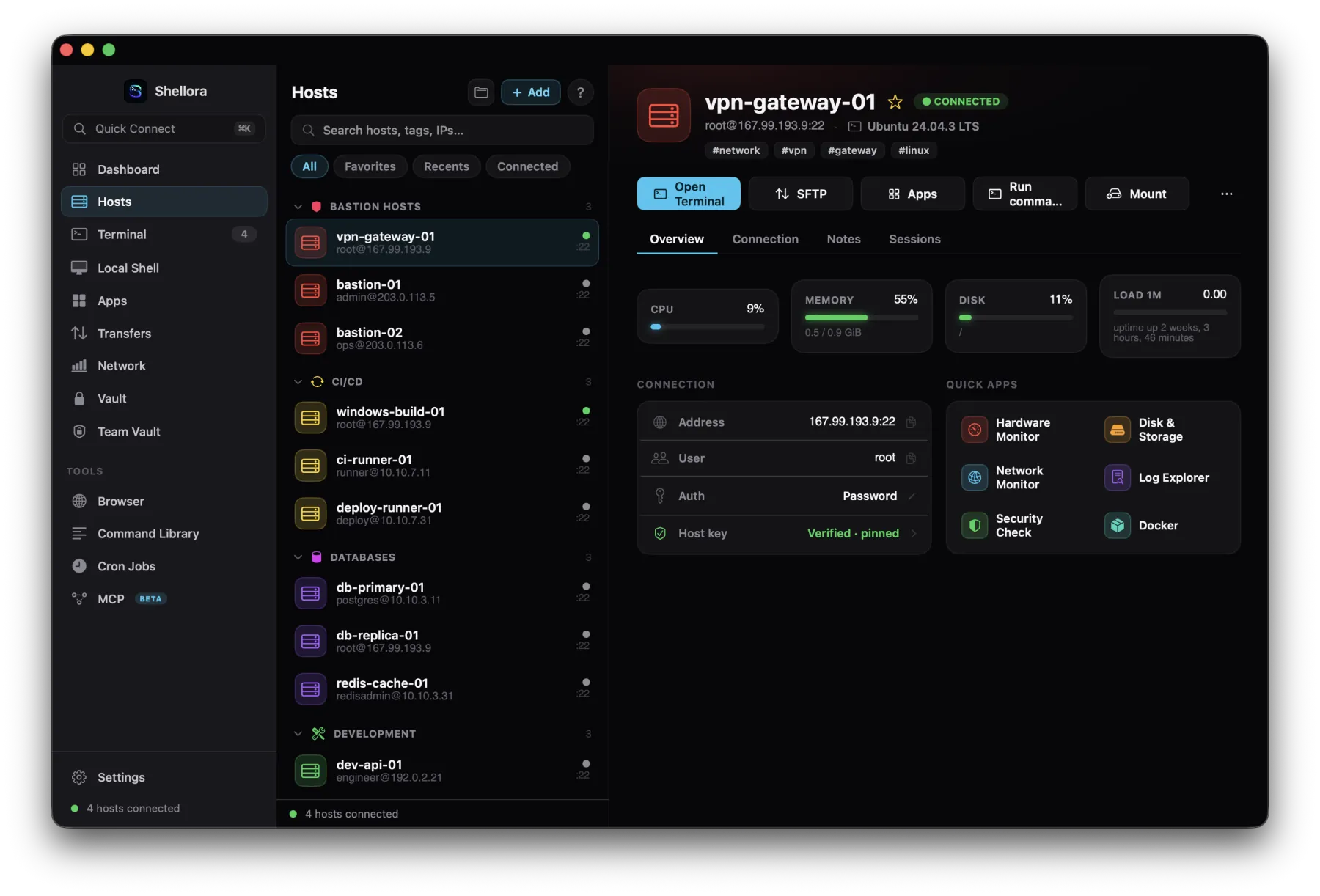
02 · Host management

A workspace for every host.

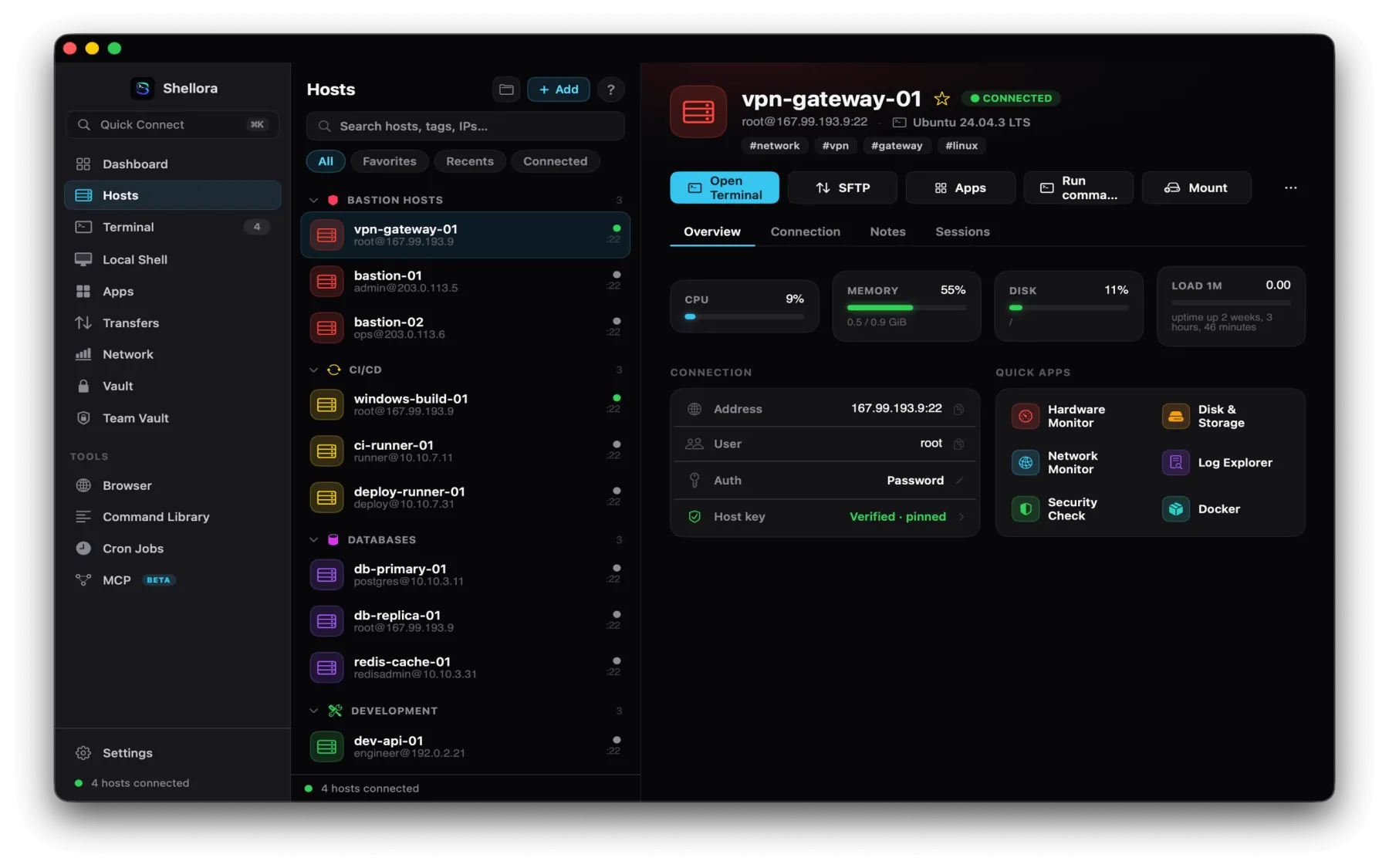
Organize servers into groups with tags, colors and favorites. Open a host to see its connection details, live metrics and quick server apps, all in one place.

  • Groups, search, favorites, recents and connected filters
  • Username, address, port, OS and authentication type
  • Host-key verification and pinning
  • One tap to Terminal, SFTP, Apps, commands or mount
Host management with grouped servers, connection details and quick apps
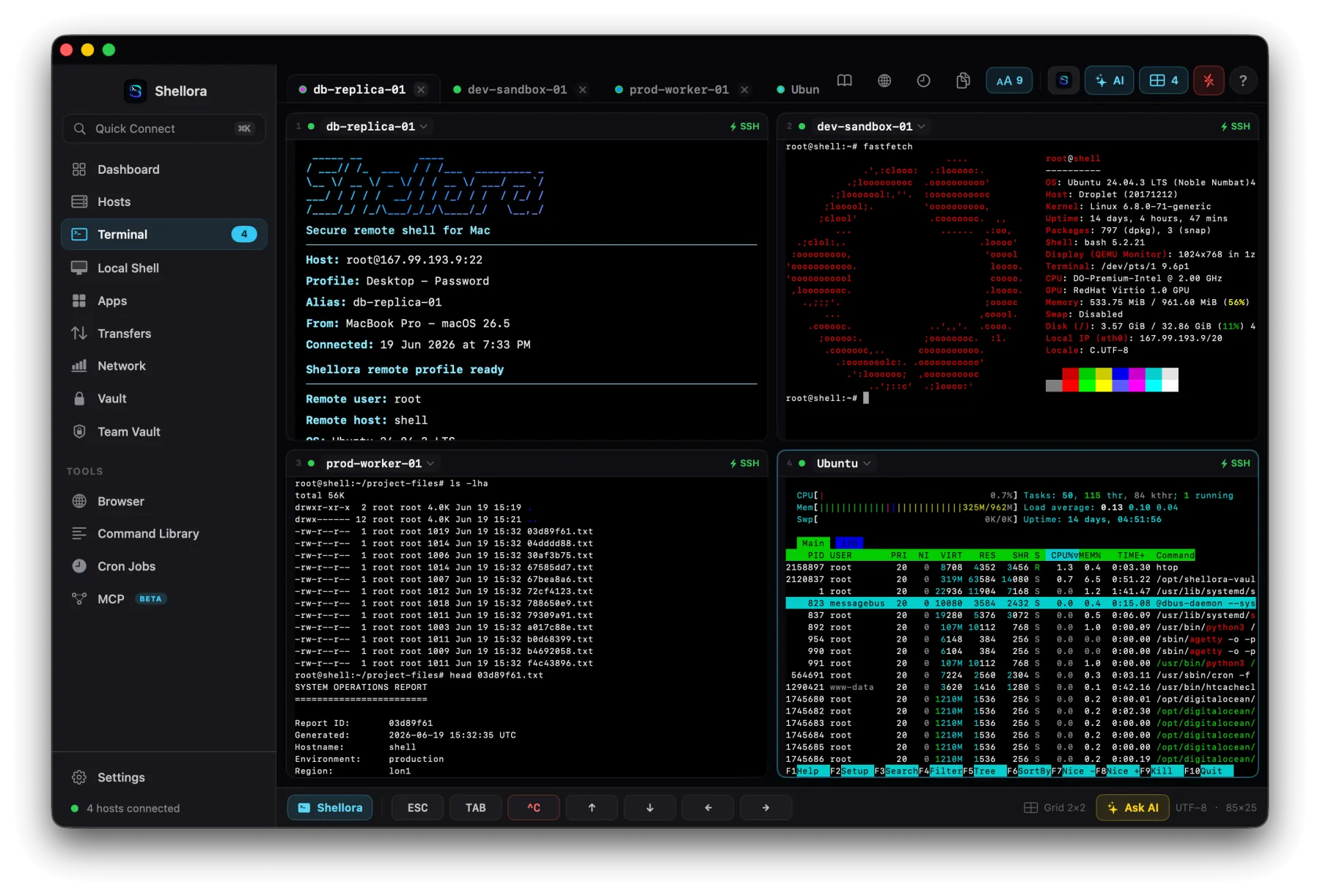
03 · Advanced terminal

A terminal built for real work.

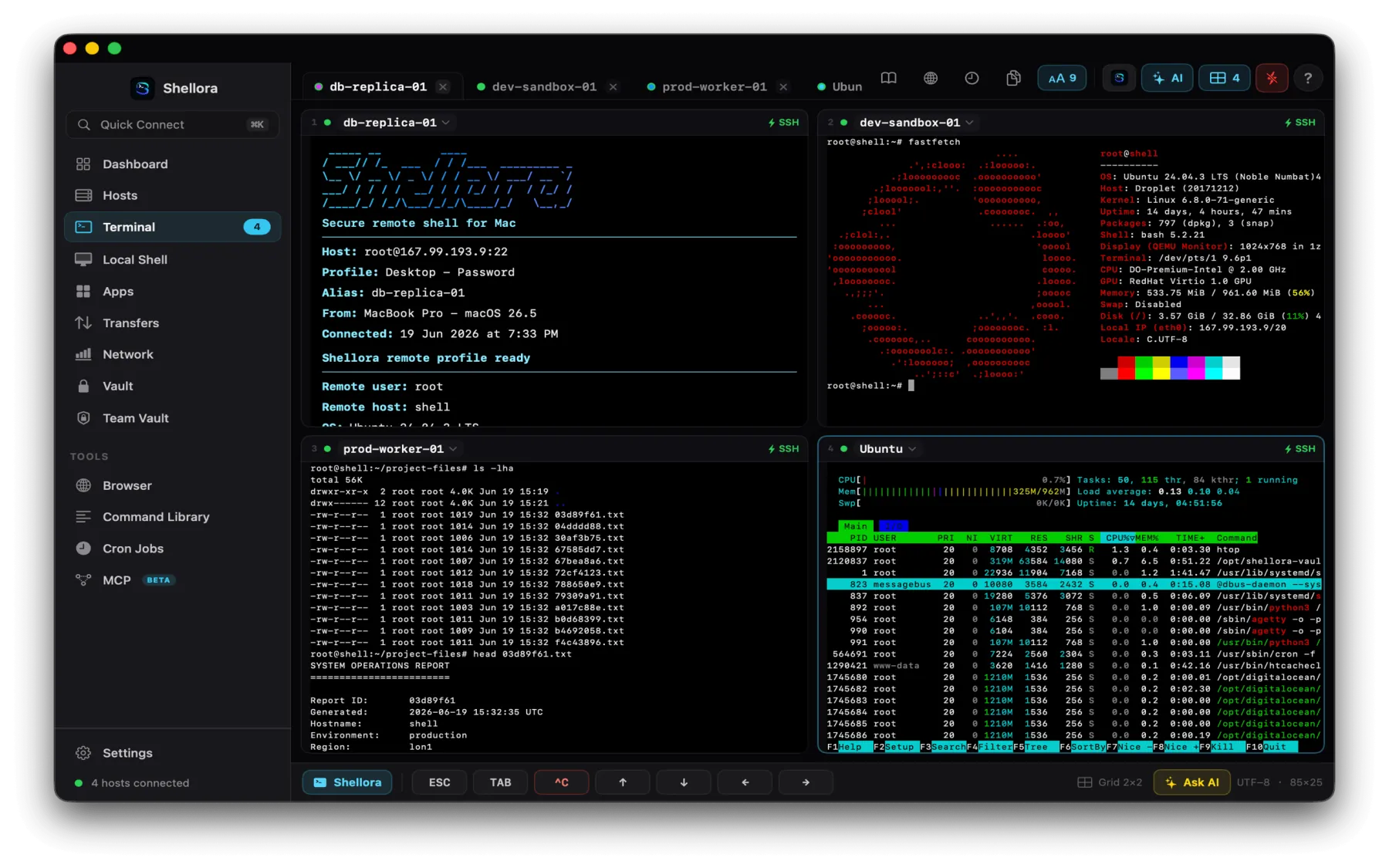
Run multiple SSH sessions side by side with clean, fast native rendering. Full support for the tools you already live in.

Single · Split · Columns · 2×2 vim · nano · htop · tmux True color & ANSI Mouse & alt-screen Local Mac shell Inline images Scrollback & shortcuts
Four simultaneous SSH sessions in a 2x2 terminal layout running htop and fastfetch
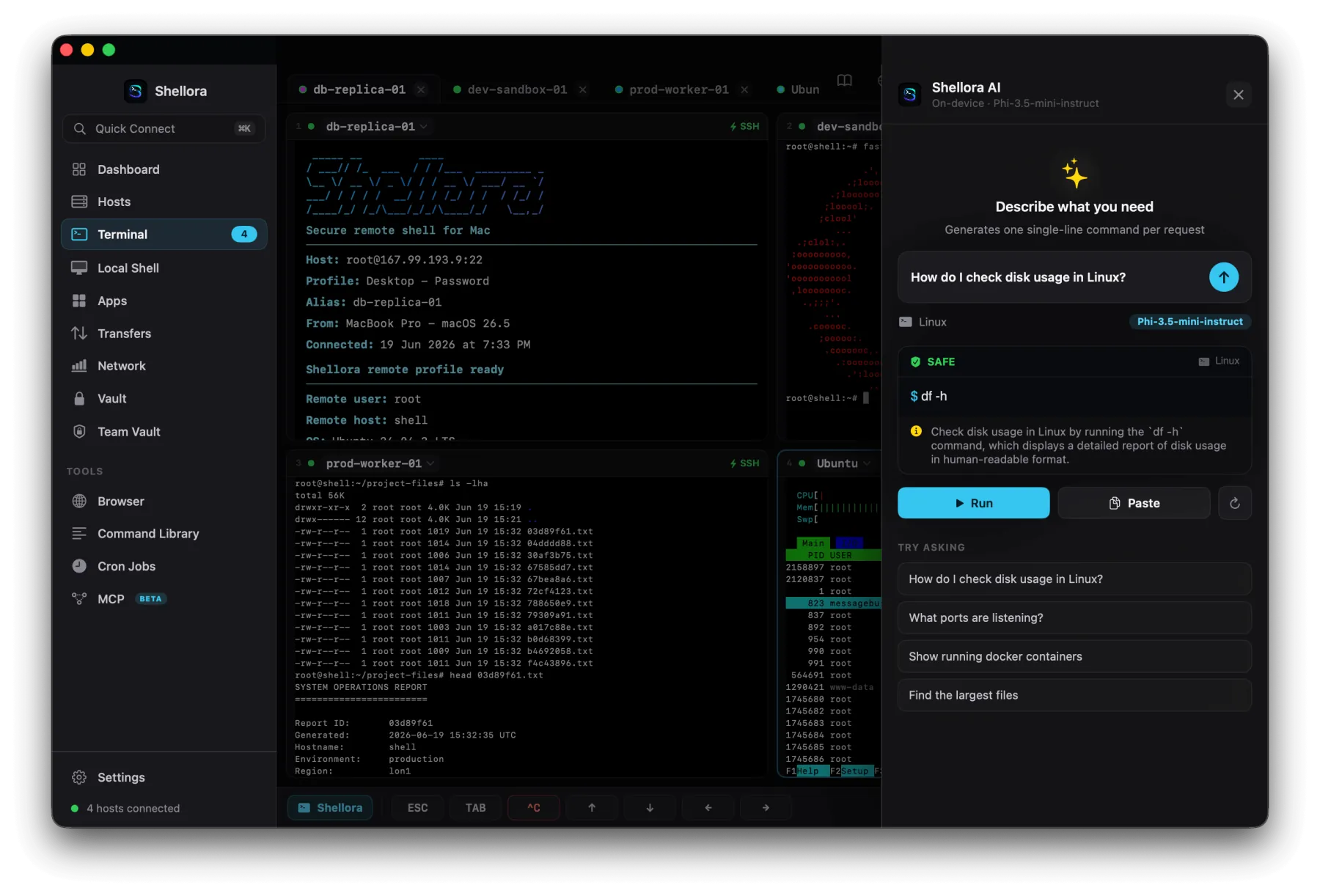
04 · On-device AI

Plain language to shell, privately.

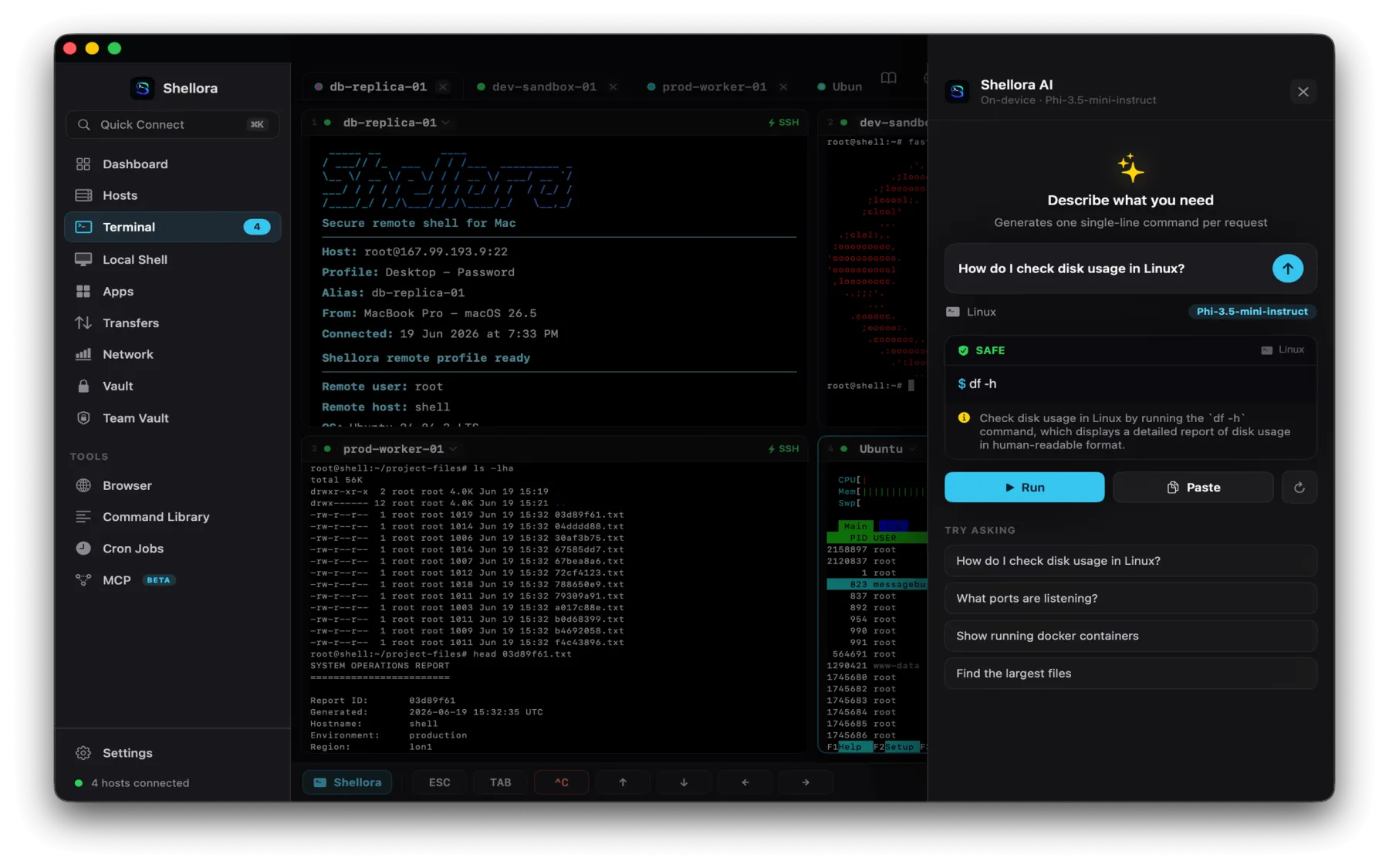
Describe what you need and Shellme writes the command, then explains it and flags how risky it is before anything runs.

  • Turns plain-language requests into shell commands
  • Explains each command with a safety classification
  • Run it or paste it into the active terminal
  • Works with local models & Apple intelligence features
Processed on your Mac. Your server data is never sent to an external AI service.
On-device AI assistant generating a command with a SAFE classification
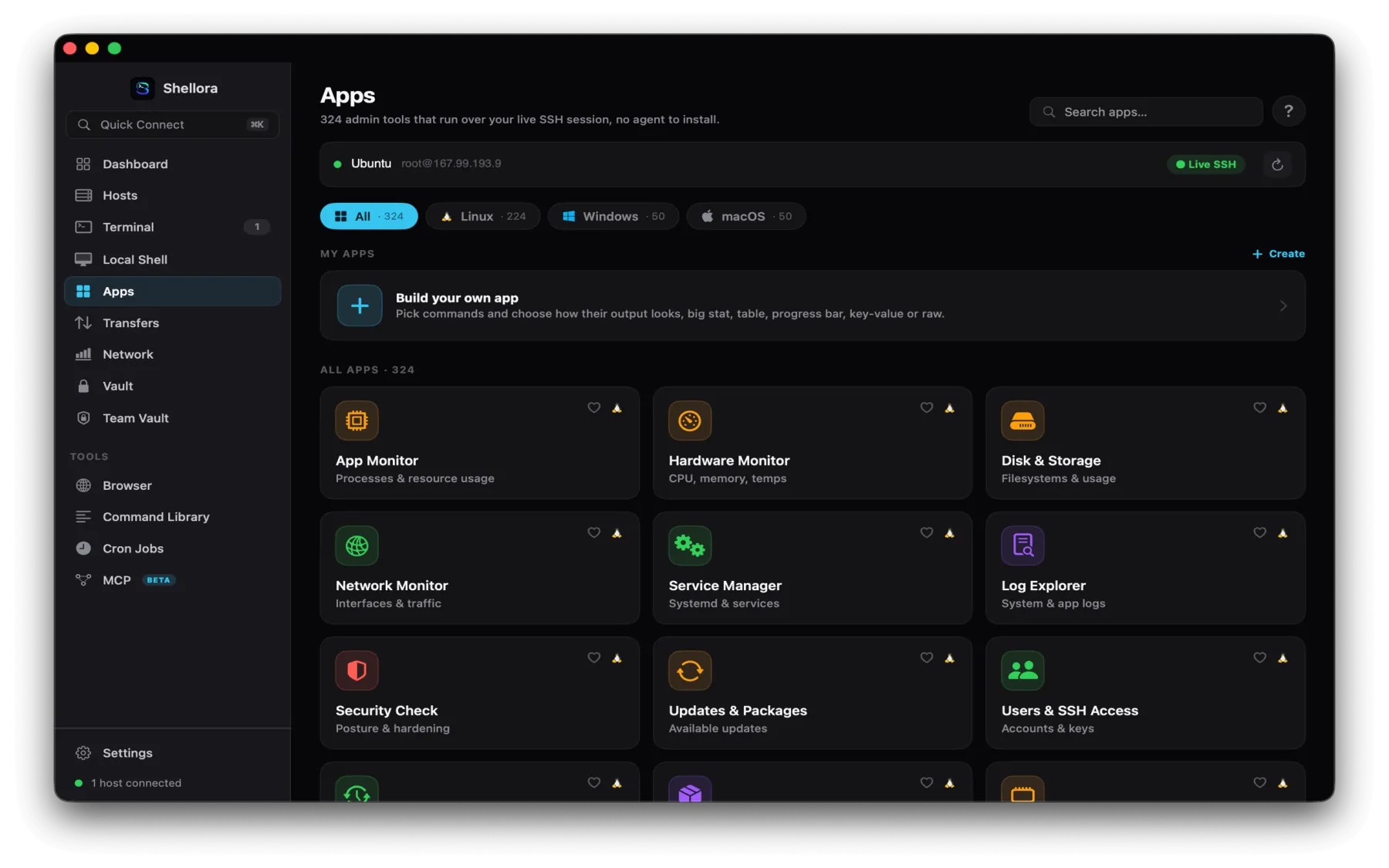
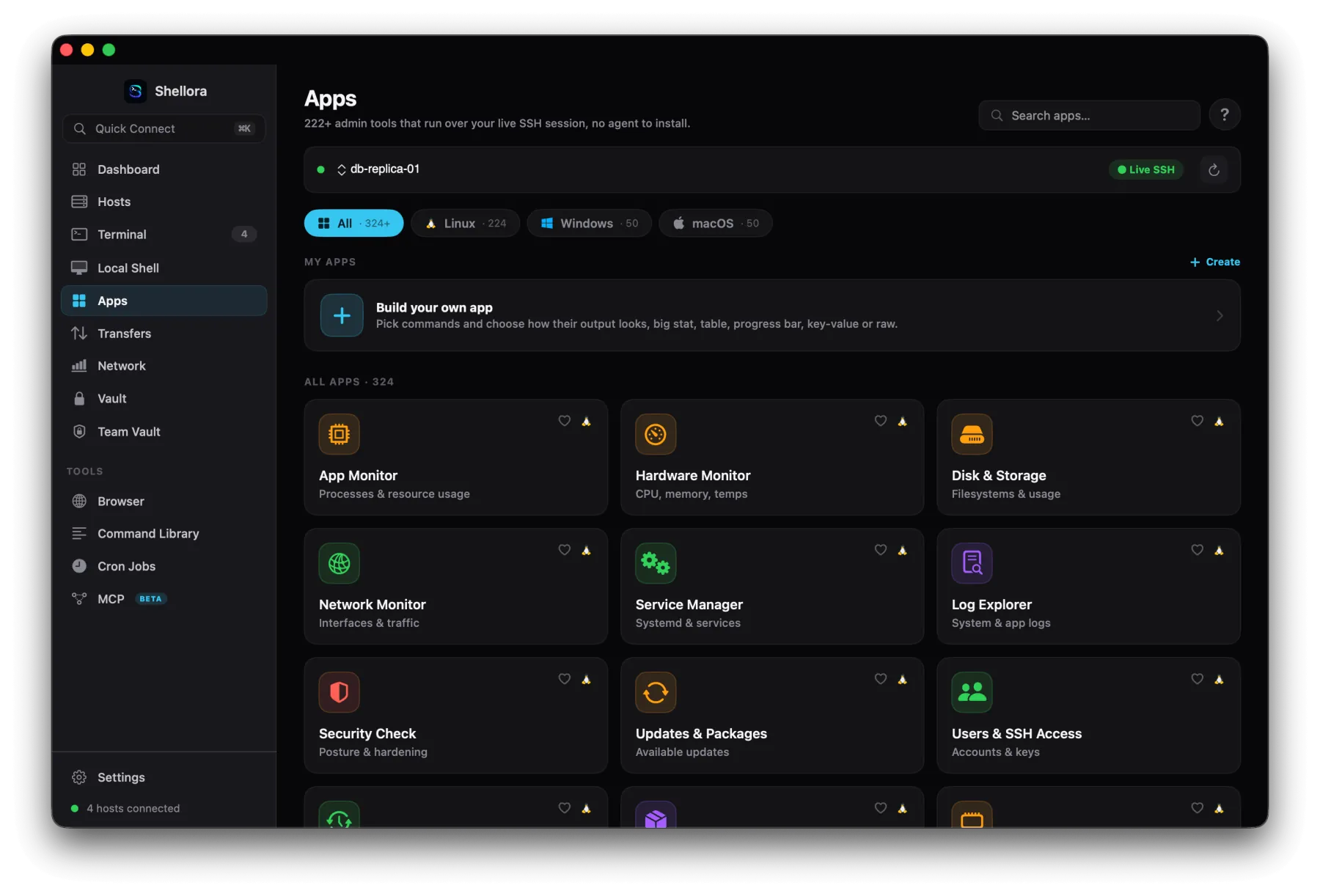
05 · 300+ server apps

SSH output, turned into dashboards.

Shellme runs admin tools over your live SSH session and renders the results as clean, live visual dashboards, no agent to install. Or build your own from any shell command.

App MonitorHardware MonitorCPU & MemoryDisk & StorageNetwork MonitorService ManagerLog ExplorerDockerKubernetesDatabasesWeb serversSSL certsUsers & SSHSecurity checksPackage updatesKernel logsSystem journalFail2BanSELinuxAppArmorNfsSambaLvm
Custom app builder. Turn your own commands into stats, tables, progress bars, key-value views or raw output.
macOS server apps gallery
Apps · 324 tools over live SSH
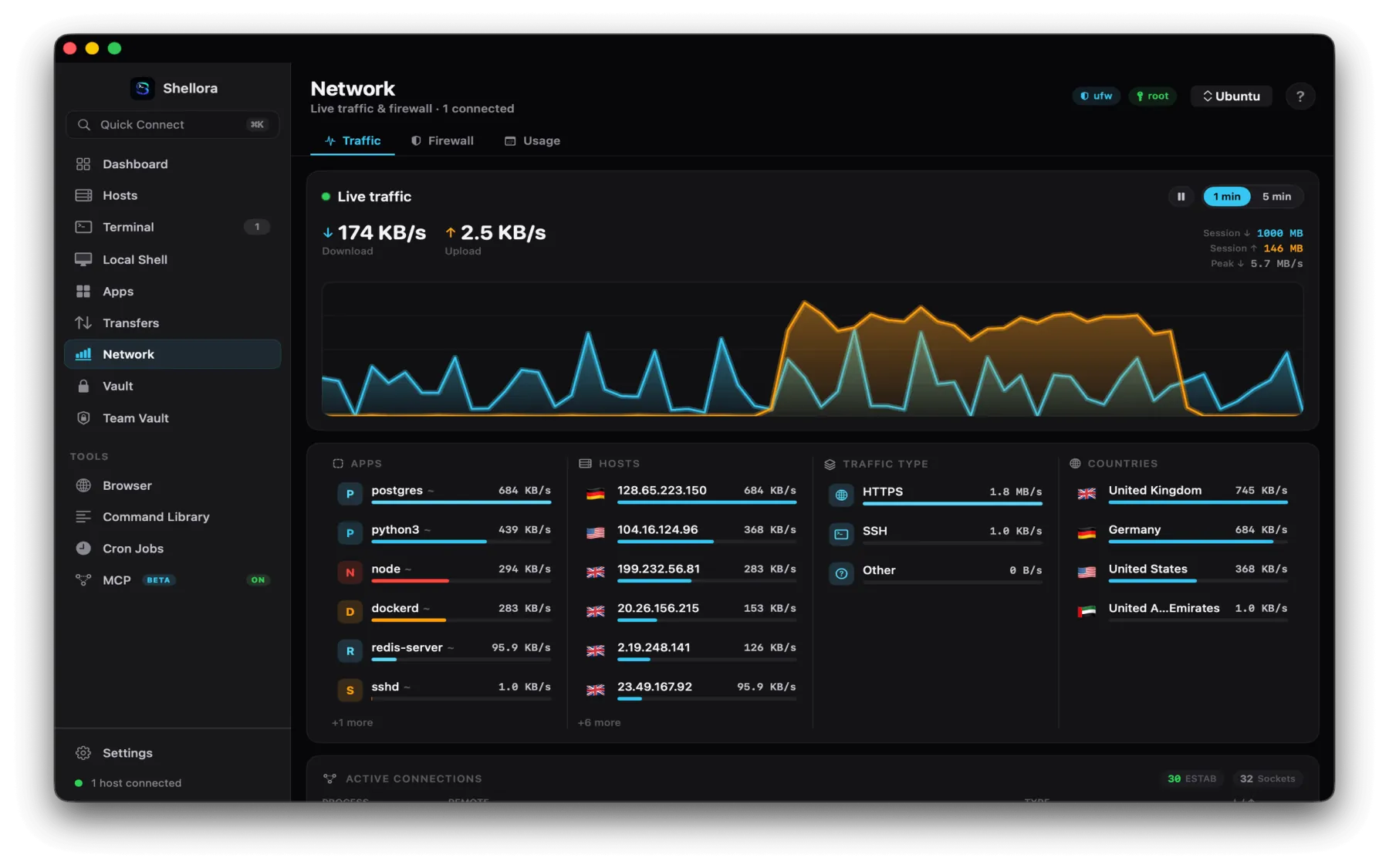
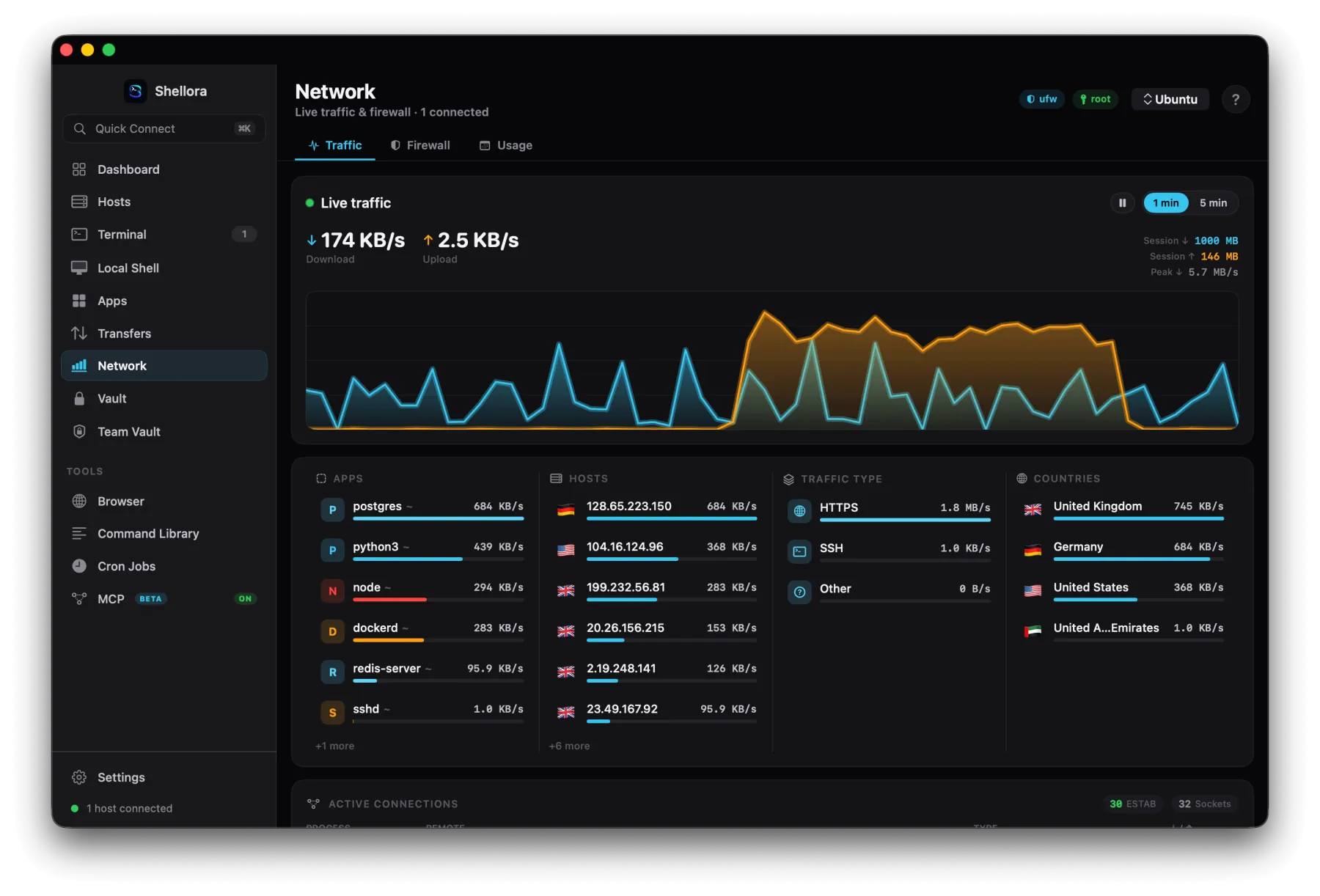
06 · Network monitoring

See exactly what's on the wire.

Live traffic, the apps and hosts driving it, and where it's going in the world, with full history you can export.

  • Live download/upload graph & per-application usage
  • Remote hosts, GeoIP, country and reverse DNS
  • Inbound/outbound connections with process & protocol
  • Hourly, daily and monthly history with CSV export
macOS network monitoring
Live traffic · apps, hosts & countries
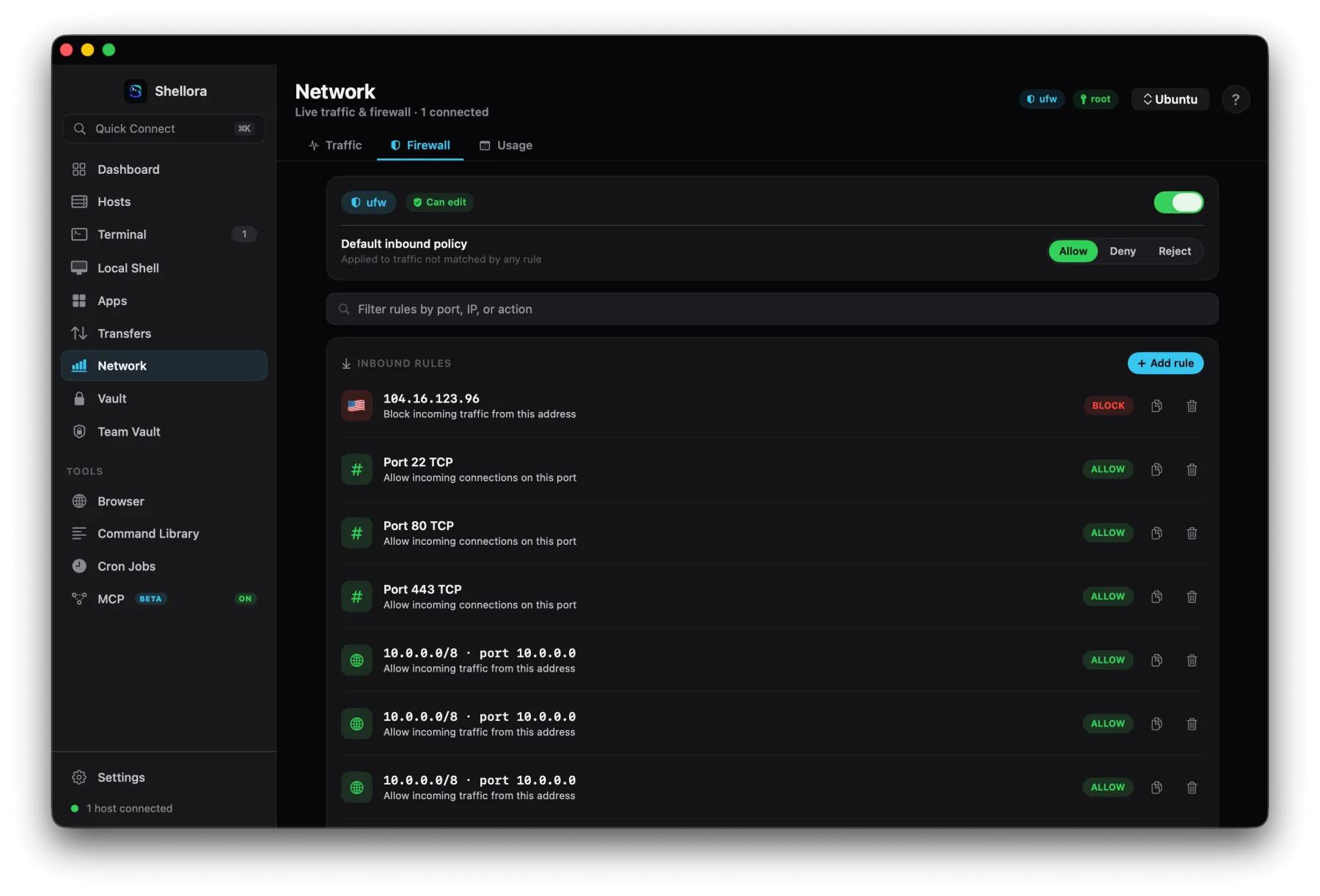
07 · Firewall management

Manage the firewall, with control.

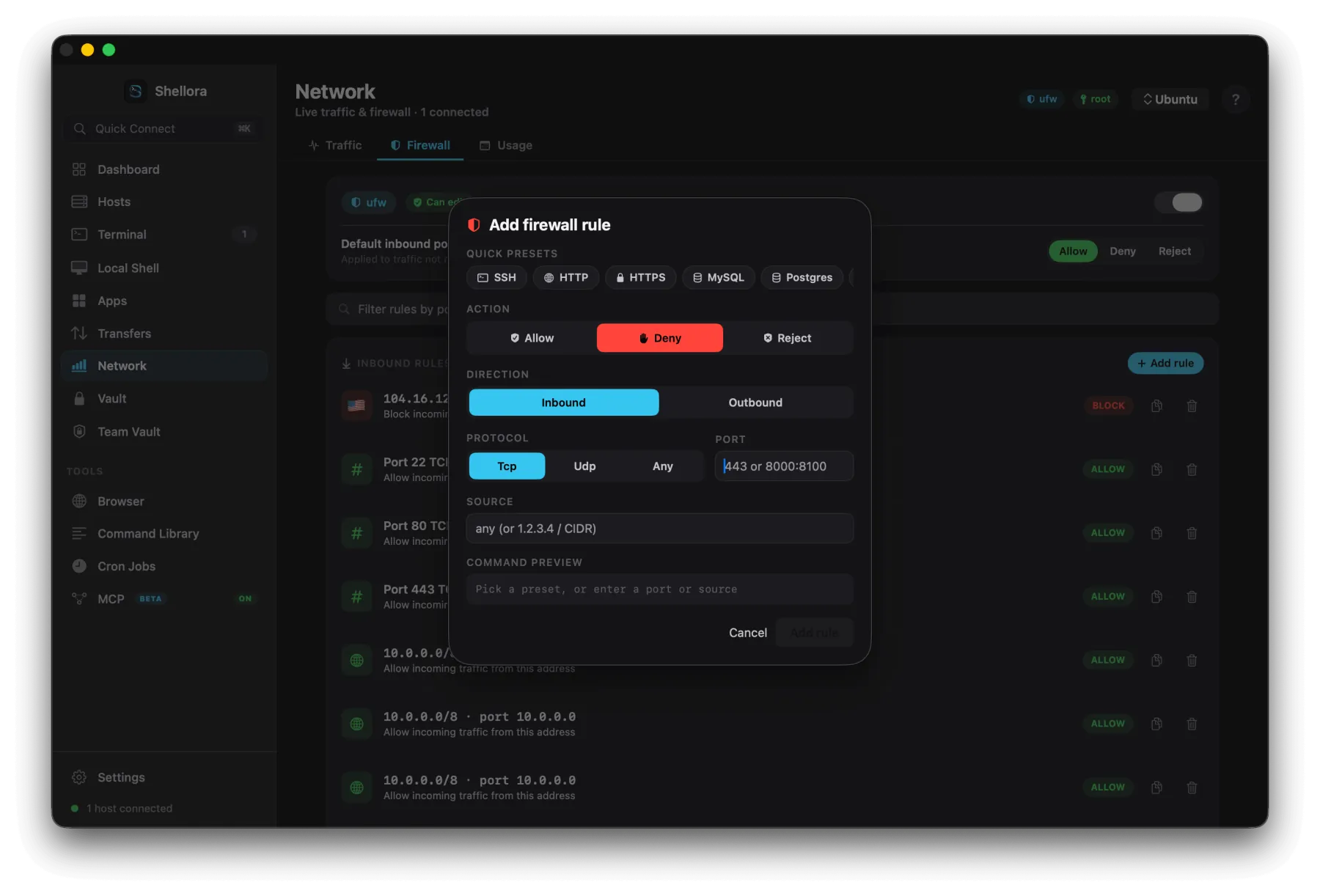
View and edit firewall rules directly over SSH, across the common Linux systems, with presets and a preview of the exact command before it runs.

UFWiptablesnftablesfirewalld
  • Allow, deny, reject, block, duplicate or delete rules
  • Presets for SSH, HTTP, HTTPS, MySQL, PostgreSQL & more
  • Set protocol, port ranges, direction, source & CIDR
Review before you apply. Every change shows the generated command first, nothing is applied silently.
Firewall inbound rules with allow and block actions
Add firewall rule dialog with presets, action and command preview
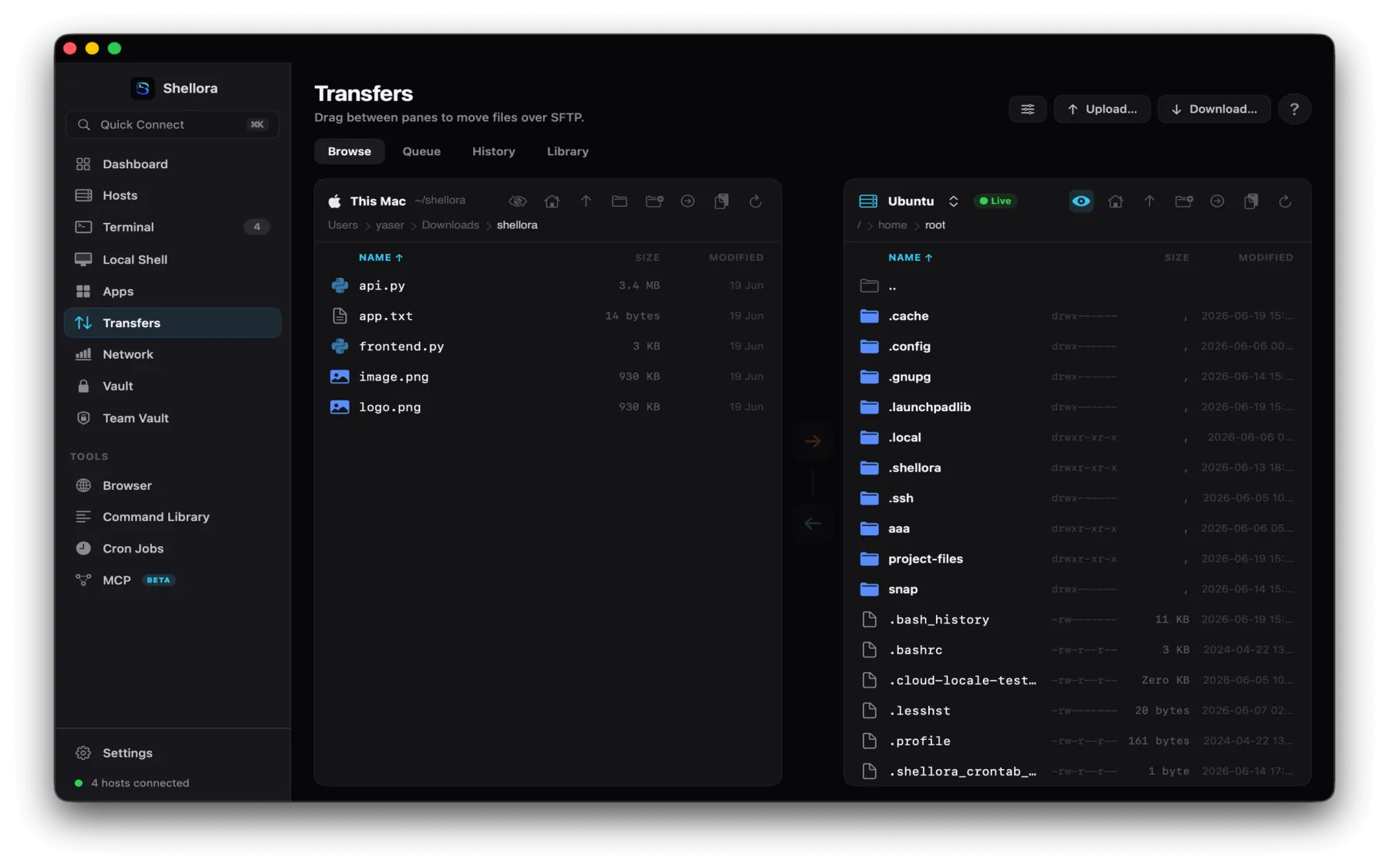
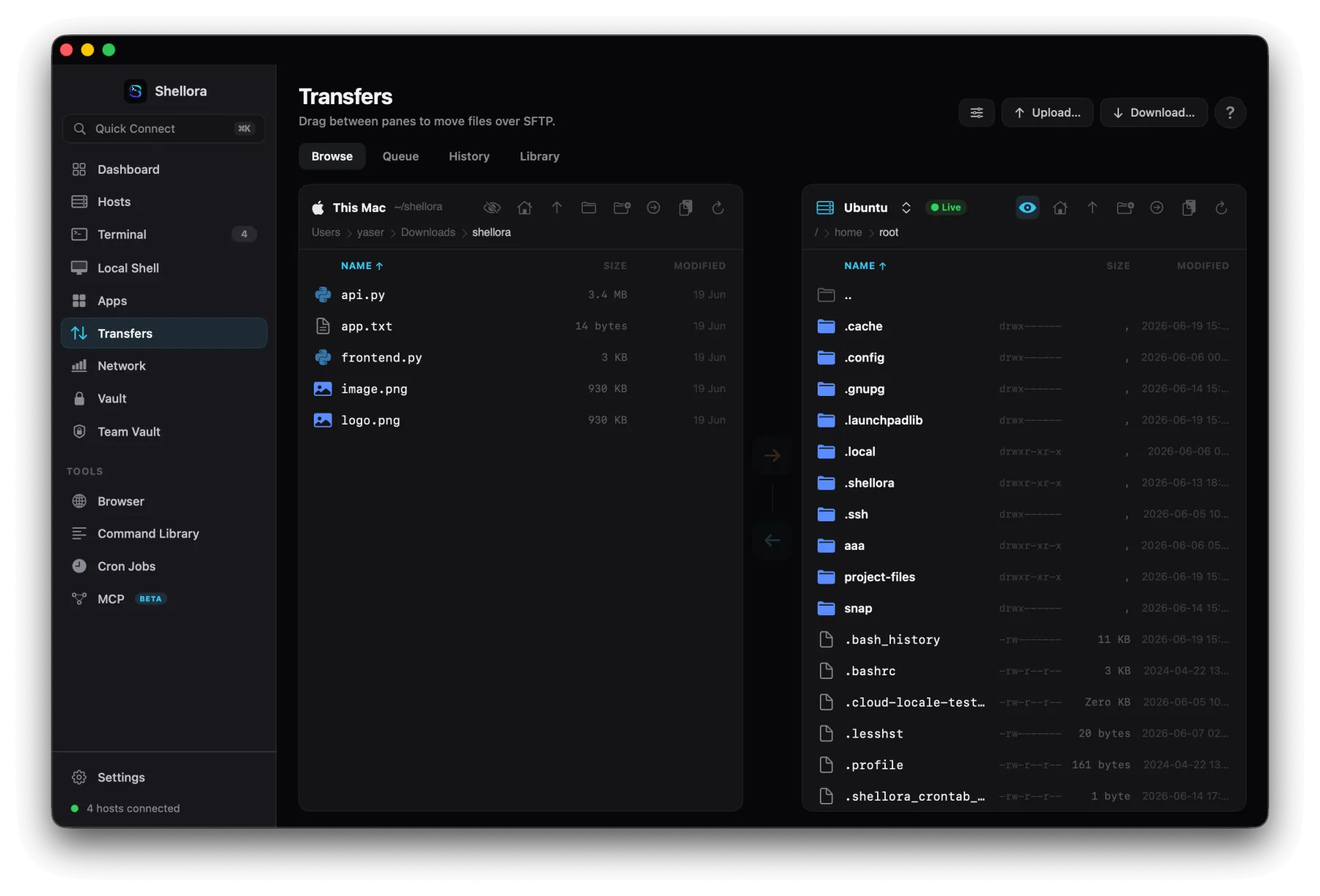
08 · SFTP file transfers

Drag files between Mac and server.

A native two-pane file manager, your Mac on one side, the remote server on the other. Drag to move files over SFTP, with a queue and full history.

  • Drag-and-drop upload & download, multi-selection
  • New folders, rename, duplicate, delete and copy paths
  • Transfer queue, history and download library
  • Verified uploads with cancellation support
Two-pane SFTP file manager with local Mac and remote server
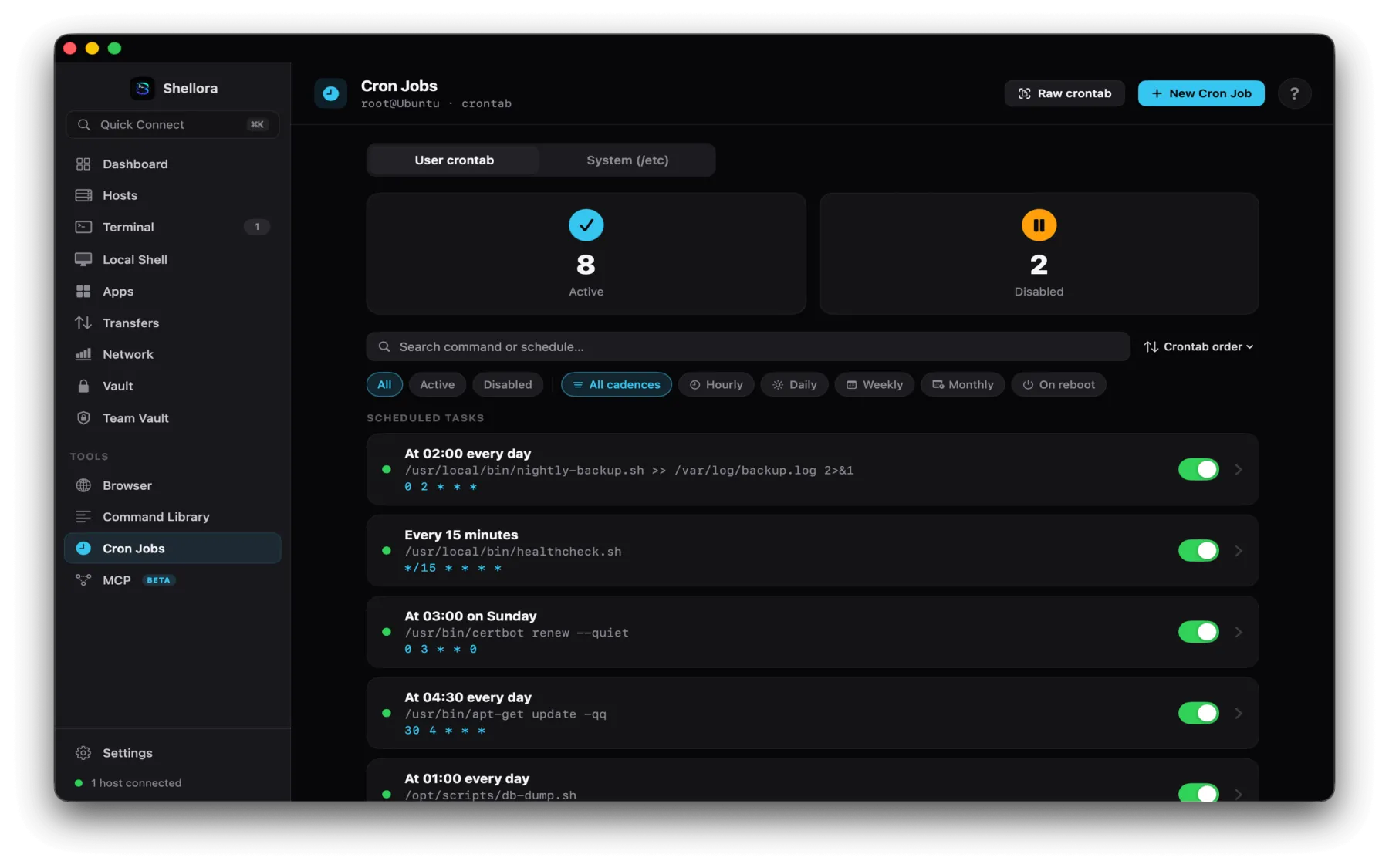
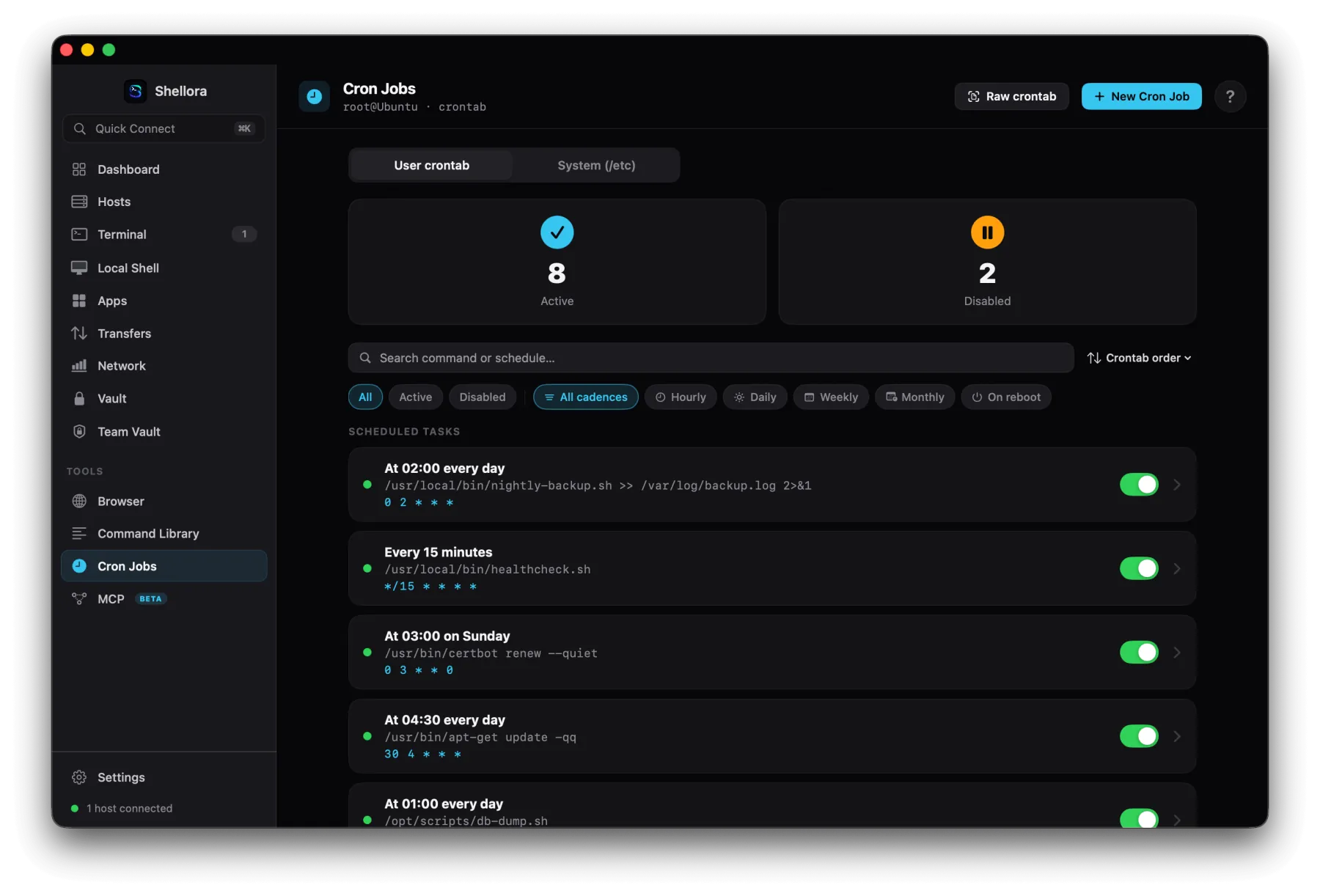
09 · Cron jobs

Scheduling without the syntax.

A visual manager for user and system crontabs, read every job in plain English, build schedules with presets, or drop into the advanced expression editor.

  • User & system crontab, active/disabled, search & filters
  • Plain-English descriptions with upcoming run previews
  • Quick builder, ready-made presets & advanced editor
  • Create, edit, run, test, enable, disable or remove jobs
macOS cron job manager
Scheduled tasks · 8 active, 2 disabled
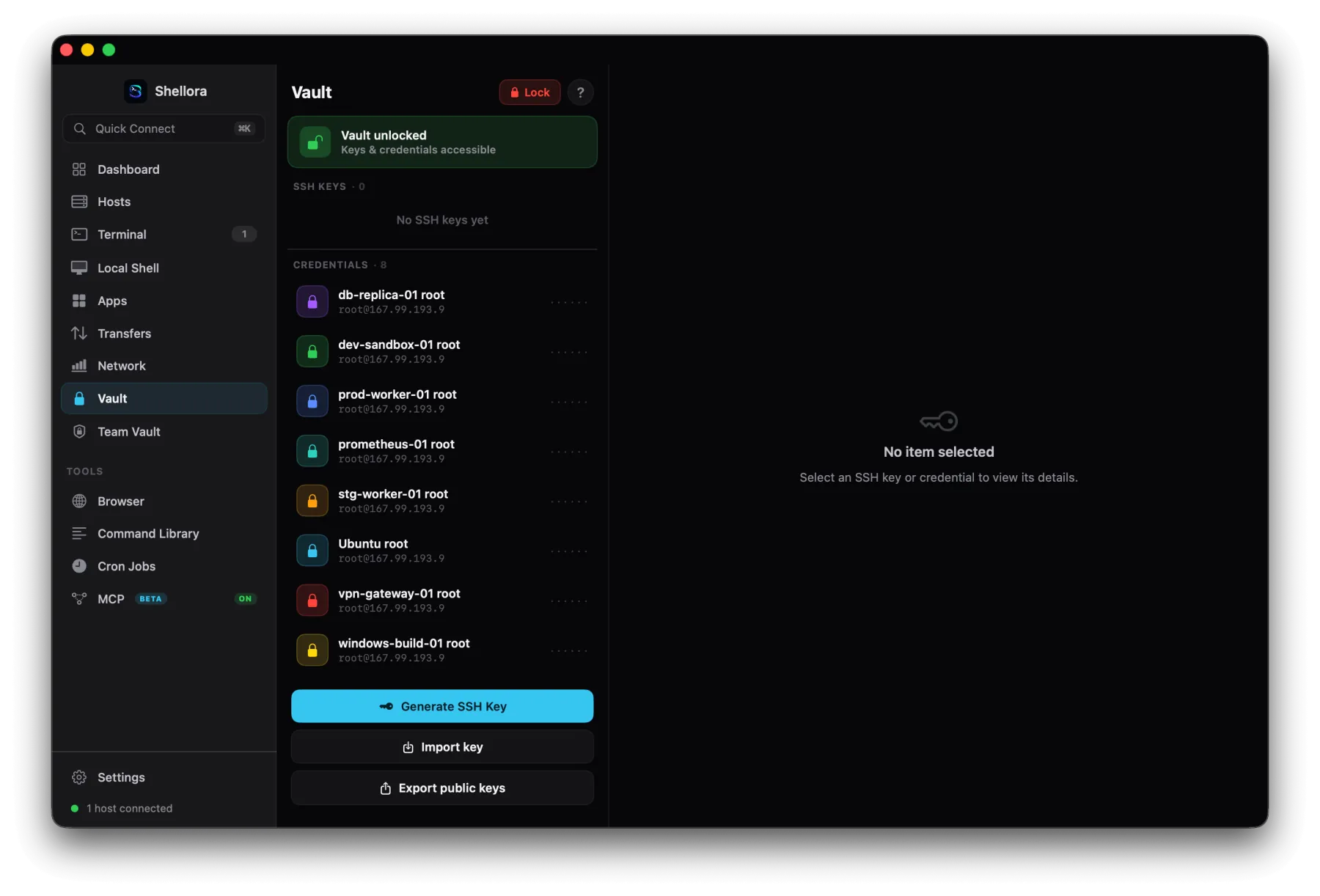
10 · Vault & team vault

Credentials, secured two ways.

Keep your own keys and credentials in a local Vault, and share access with your team through an end-to-end encrypted Team Vault.

Local Vault

SSH credentials, passwords and private keys, generate, import or export public keys, with secure lock/unlock.

● Protected by the macOS Keychain
Team Vault

Share hosts, credentials, keys and reusable command snippets. Secrets are encrypted on your device before they sync.

● Shellme cannot decrypt your secrets
Vault with stored SSH credentials, unlocked
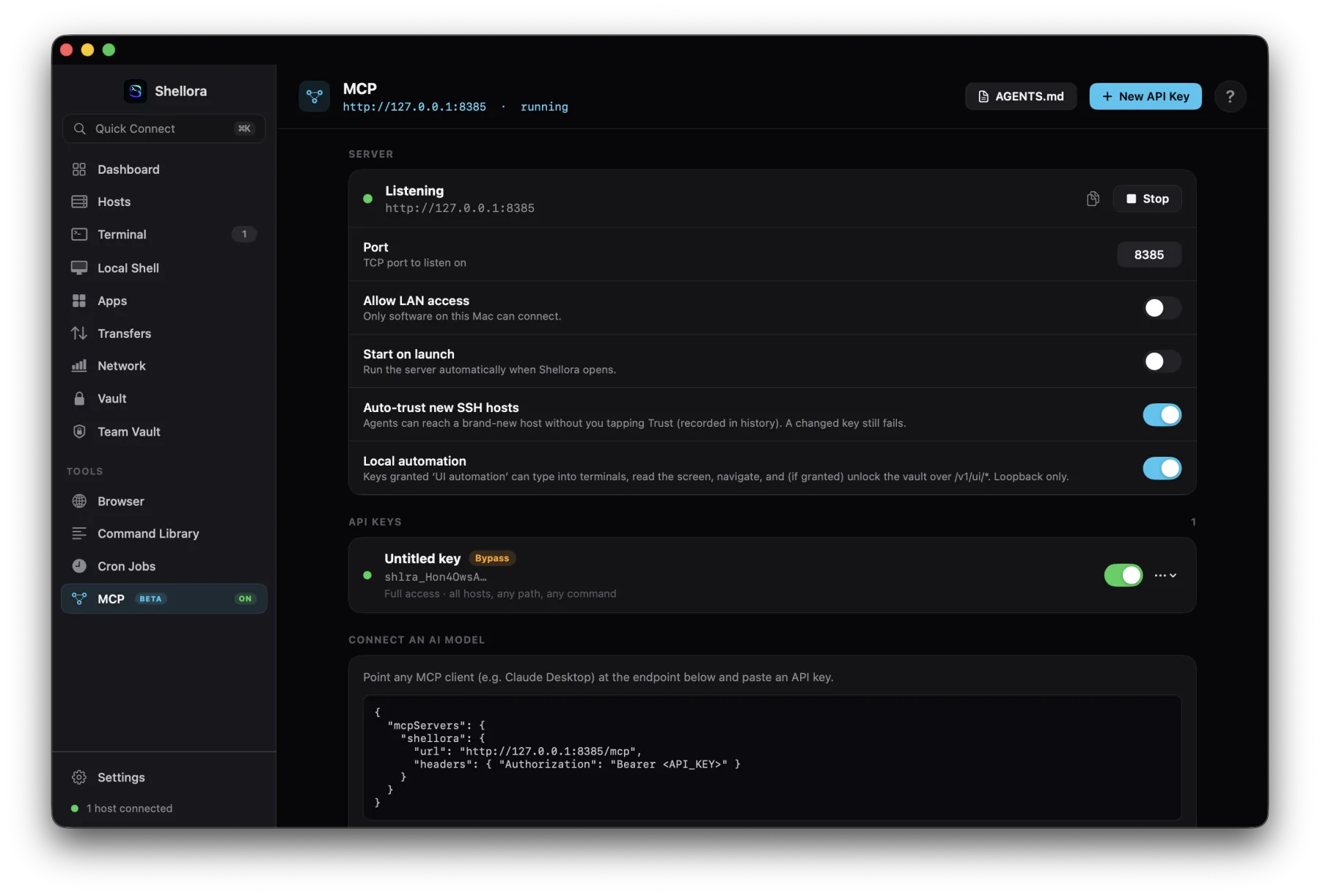
11 · MCP for AI agents

Give agents scoped server access.

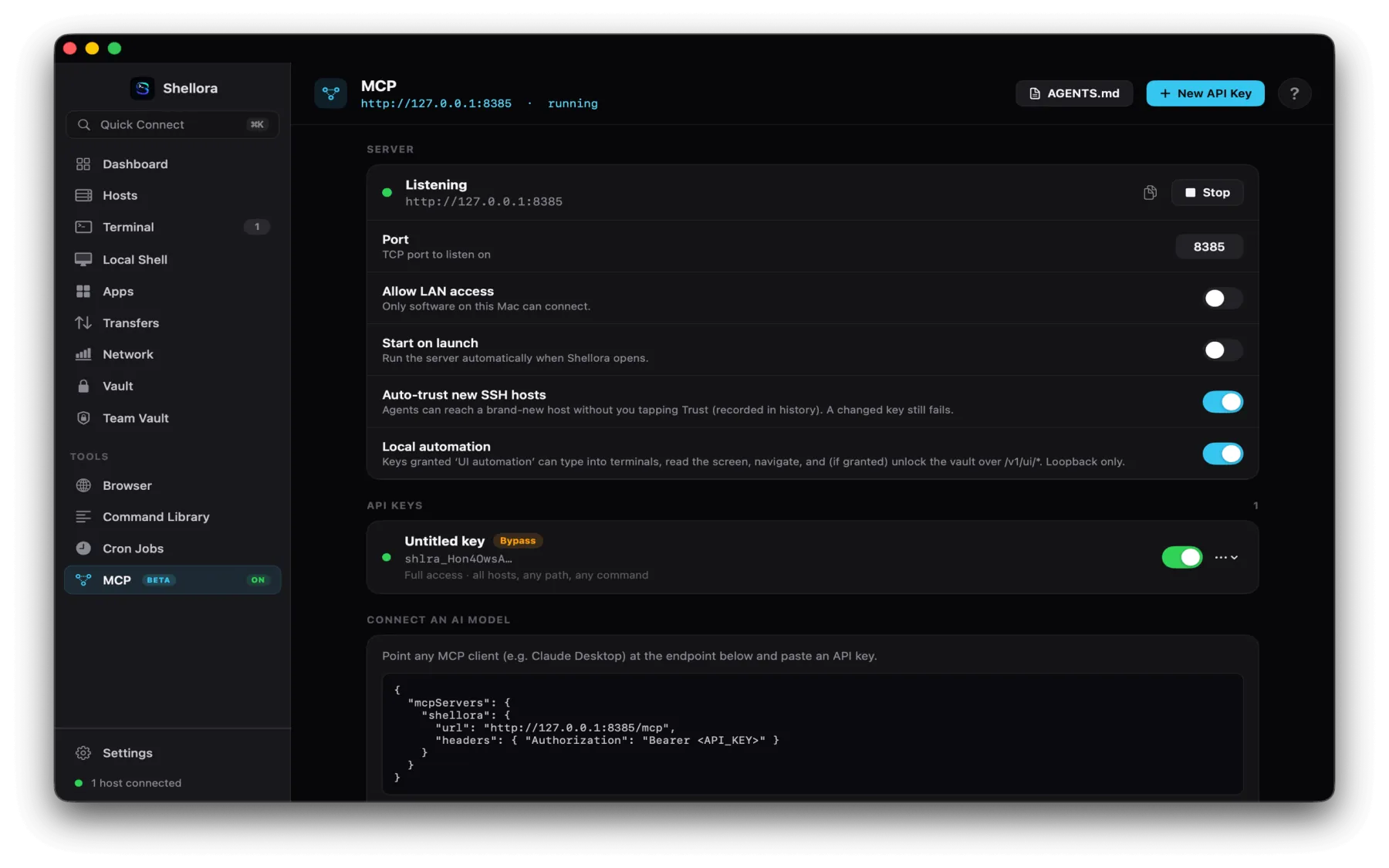
A built-in MCP server lets supported AI clients and coding agents work with your servers through Shellme, with permissions you control down to the host and capability.

  • List hosts & directories, read/write files, run commands
  • Read-only or read-and-write, per-host restrictions
  • Multiple API keys with fine-grained capability controls
  • Local-only by default, with request history & auditing
Least privilege, by design. Grant only the hosts, paths and capabilities an agent needs, restricted access is the recommended setup.
macOS MCP server settings
MCP server · local endpoint & API keys
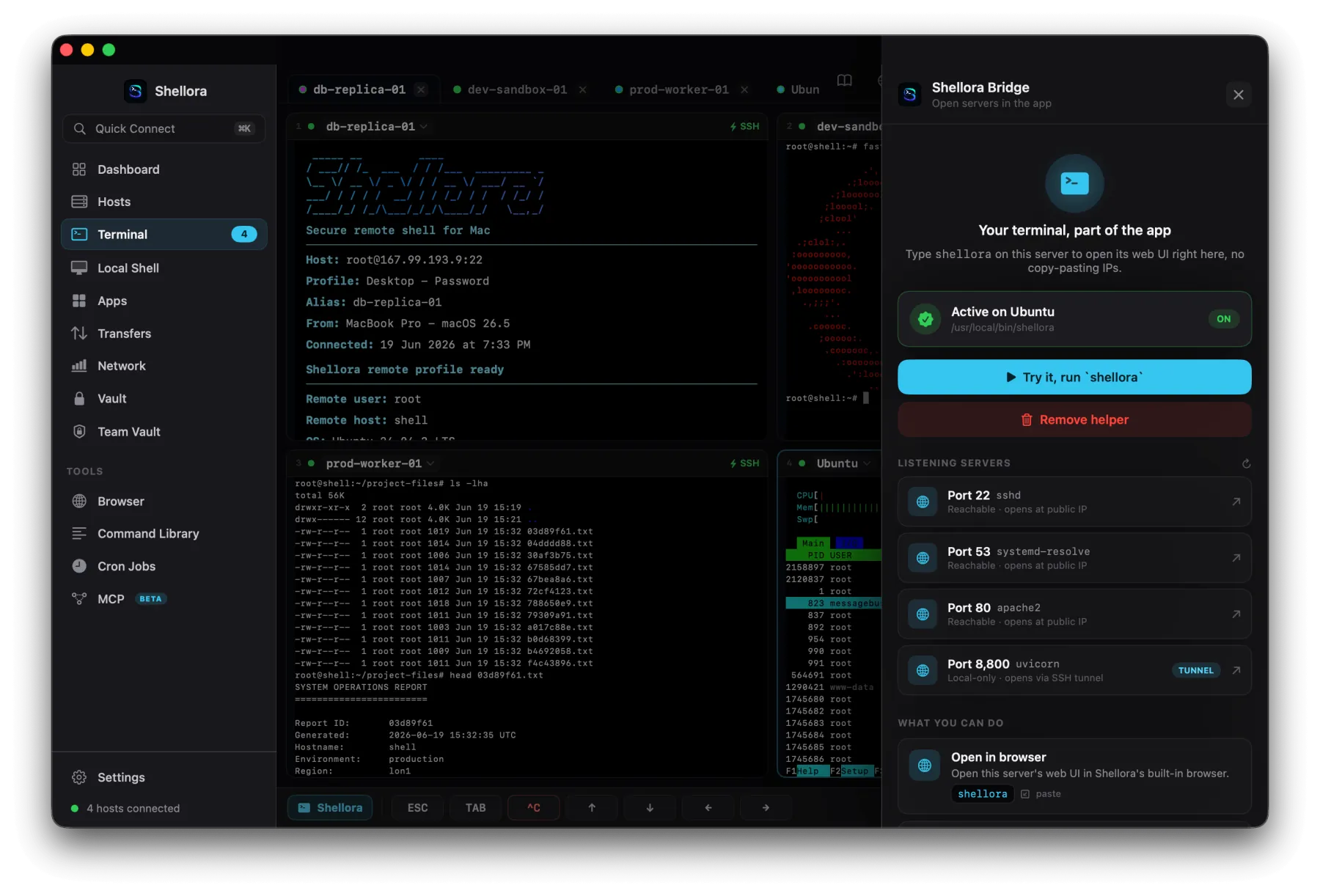
12 · Shellme bridge

Open server web UIs inside the app.

Bridge detects the services listening on a server and opens their web interfaces right inside Shellme, through secure SSH tunnels, no copy-pasting IP addresses.

  • Detects listening services and ports automatically
  • Identifies SSH, DNS, Apache and local web apps
  • Opens remote interfaces over secure SSH tunnels
  • Type the shellme helper on a server to open its UI
Shellme Bridge detecting listening servers and ports
More on the Mac

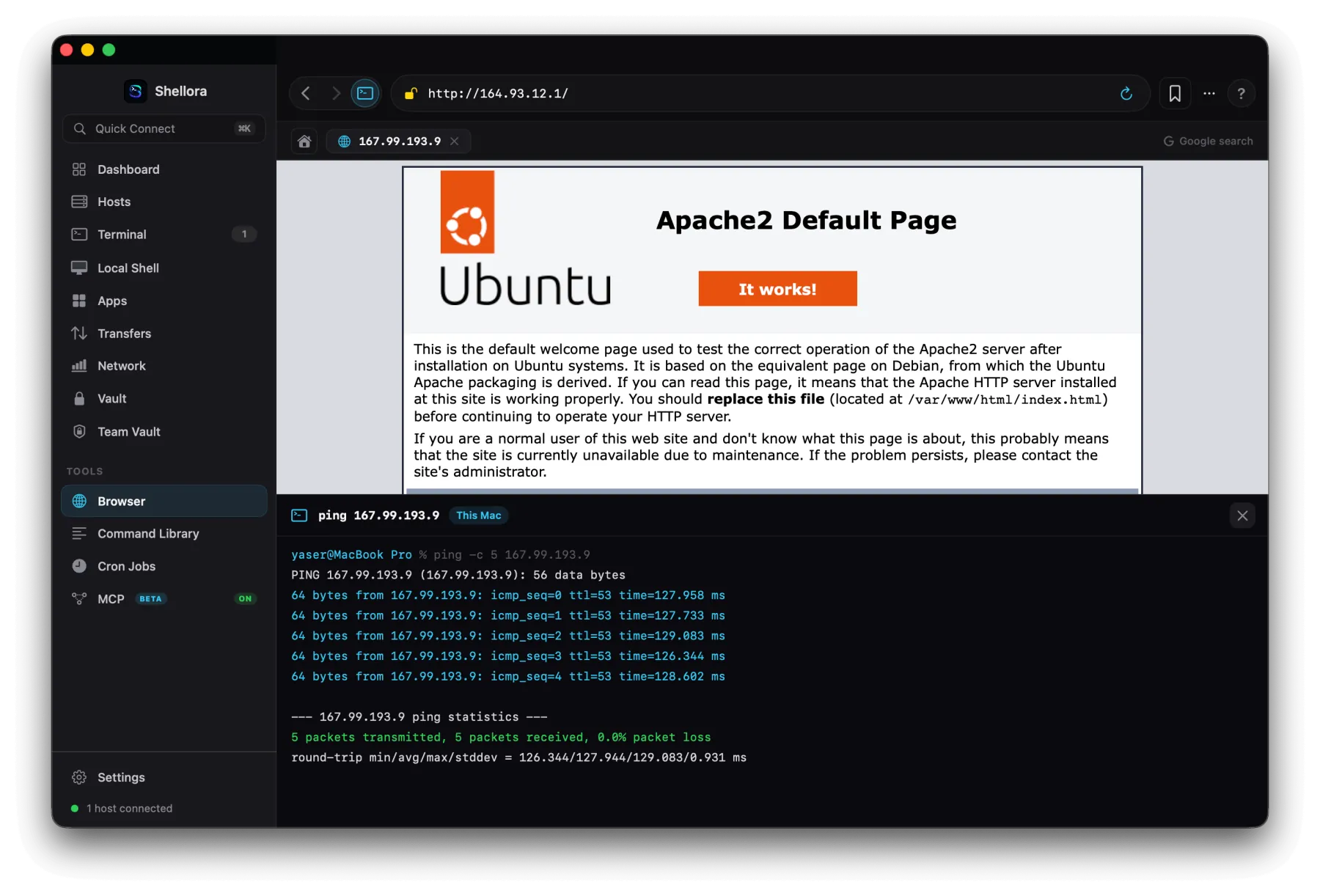
Built-in browser, command library and deep customization.

Built-in browser with SSH port forwarding and a ping terminal
In-app browser

Open server interfaces with SSH local port forwarding, dev tools, and tools like ping, curl, traceroute, whois and DNS lookups right beside the page.

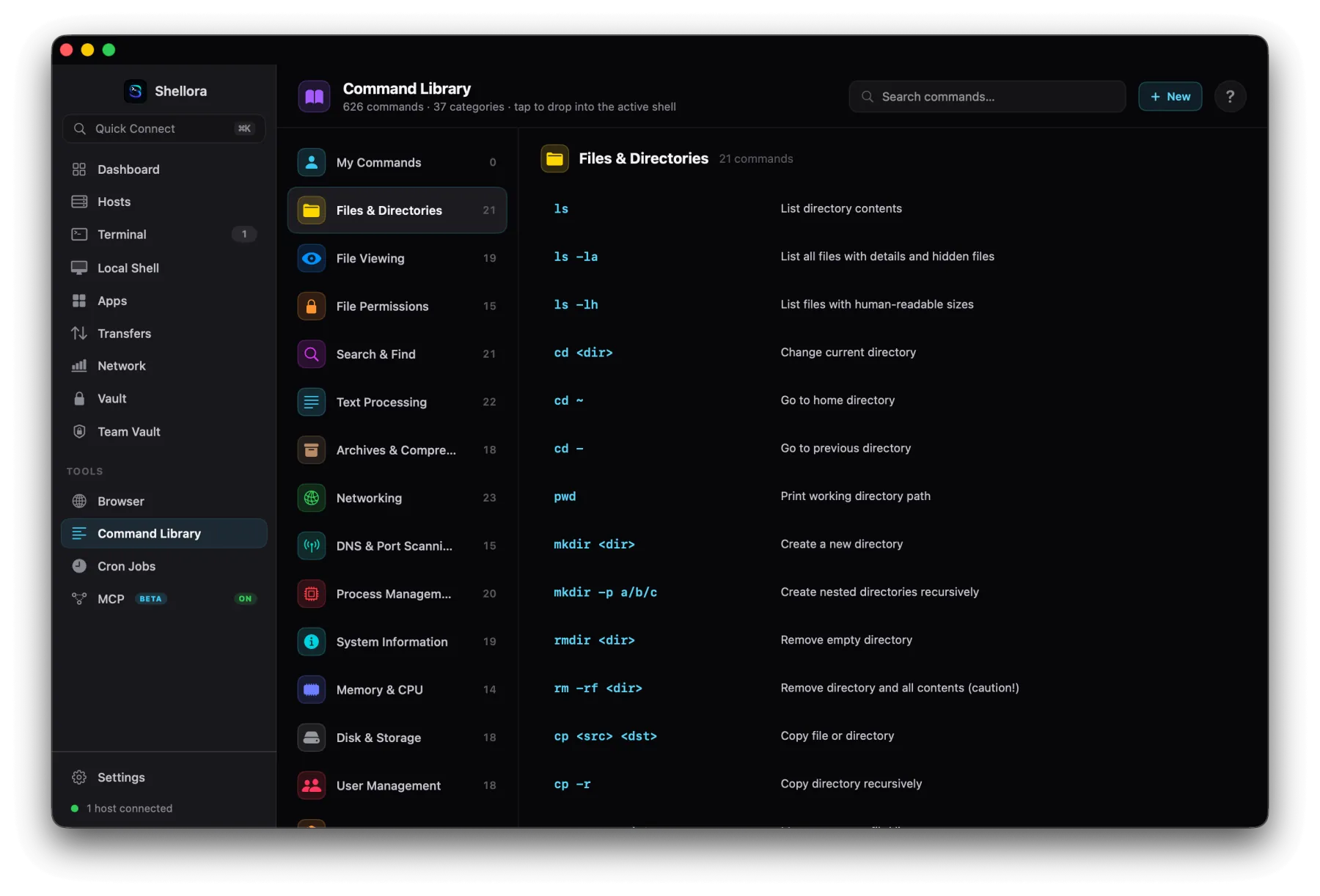
Command library with 626 commands across 37 categories
Command library

626 commands across 37 categories, files, networking, processes, security and more, inserted into the active shell with one click. Save your own, too.

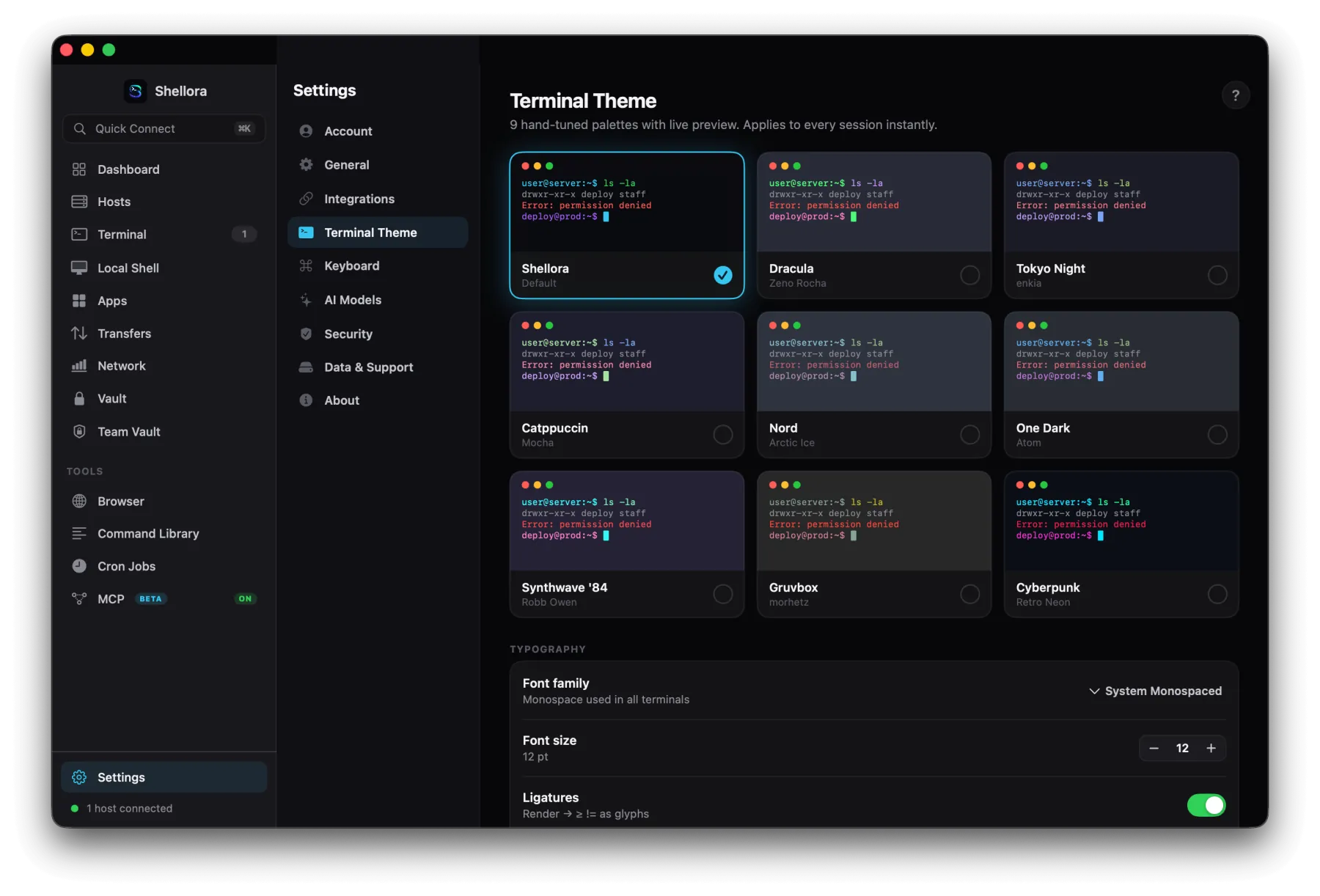
Terminal theme picker with nine palettes and typography settings
Settings & themes

Hand-tuned terminal themes with live preview, font family, size and ligatures, plus keyboard, AI model, security and integration settings.

Get Shellme for Mac.

A complete SSH and server-management workspace, free with no subscription. Universal for Apple Silicon and Intel.

Agentless over SSH · On-device AI · End-to-end encrypted Team Vault

Ship anywhere
from thumb to desk.

A real shell, on-device AI, a 600+ command library, 300+ visual server apps, SFTP, network and firewall tools, cron, themes and an encrypted vault, focused on iPhone and iPad, and a complete workspace on the Mac.